New Starter Form Template
A new starter form collects the details HR needs from a new employee before their first day: personal and contact details, emergency contacts, payroll and bank information, and right-to-work documents. Use this free template to send one online form, get every answer in one table, and skip the paper forms on day one.
What is a new starter form?
A new starter form, sometimes called a new employee form or employee onboarding form, is the first form a new hire fills in. It gives HR and payroll the information they need to add the person to your systems, pay them on time and know who to call in an emergency.
Sending it online, a week or two before the start date, means the new starter can fill it in at home, check their documents and ask questions early. On day one, they can focus on meeting the team instead of filling in paperwork.
New starter form vs HMRC starter checklist
In the UK, the two are often confused. The HMRC starter checklist is an official HMRC form that helps you work out the right tax code for an employee who doesn't have a P45 from their last job. Your new starter form is your own internal form, and it can cover much more: contact details, emergency contacts, bank details, equipment and policies.
This template includes a question asking whether the new starter has a P45. If they don't, ask them to complete the official starter checklist on GOV.UK as well. Always check the latest HMRC guidance for your payroll process.
What to include in a new starter form
Only ask for what you really need, and tell new starters why you're asking. The template groups the questions into six short sections:
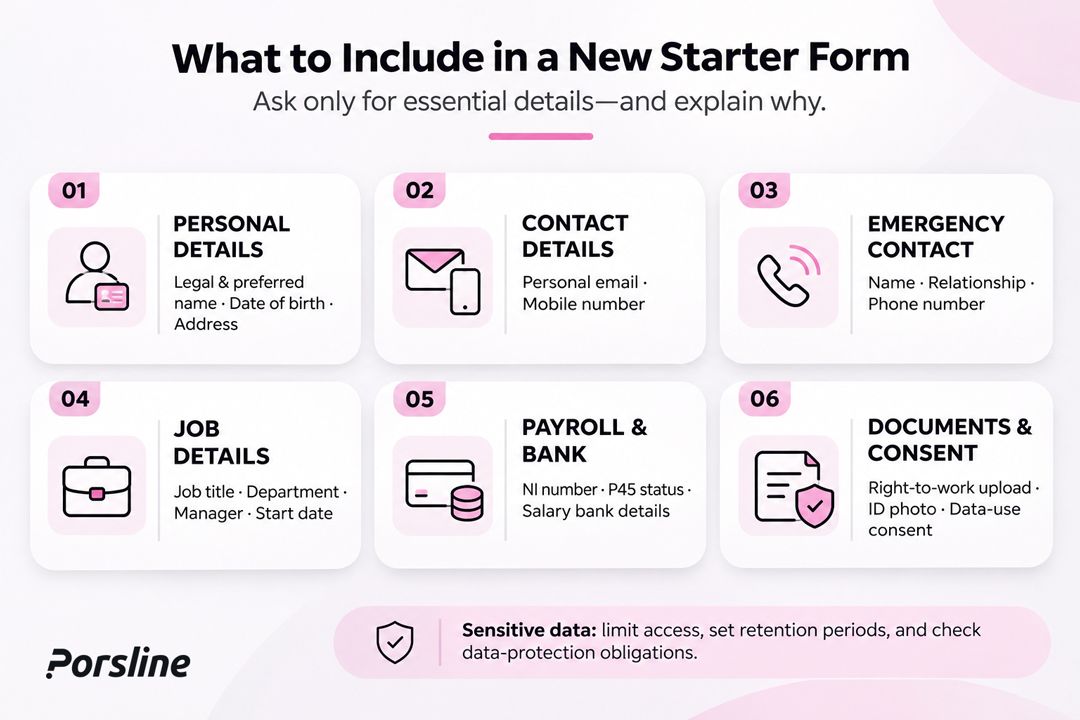
- Personal details: full legal name, preferred name, date of birth and home address.
- Contact details: personal email and mobile number.
- Emergency contact: name, relationship and phone number.
- Job details: job title, department, manager and start date.
- Payroll and bank details: National Insurance number, whether they have a P45, and bank account details for salary payments.
- Documents and consent: right-to-work document upload, a photo for an ID badge, and a consent question about how their data will be used.
Some of these details are sensitive. Limit who can see the responses, keep them only as long as you need to, and check your data-protection obligations before you start collecting them.
How to create a new starter form in Porsline
- Start from this template. Click "Use this template" and sign up for free, or log in to your account.
- Edit the questions. Remove what you don't need and add your own, for example a T-shirt size or a laptop preference. You can also describe the form you want and let AI create a first draft.
- Set answer formats. Use date questions for the date of birth and start date, and fixed patterns for short text such as a sort code or postcode, so answers come in the right format.
- Add your branding. Add your logo, colors and fonts so the form feels like part of your welcome.
- Add logic and uploads (Pro plan). Show the P45 follow-up only to people who answer "No", and let new starters upload their right-to-work document and sign the form.
- Get notified (Pro plan). Send an email to HR each time a form is submitted, and customize the thank-you page with what happens next.
- Share the link. Email the link to each new starter or include it in your offer email. For extra security, ask new starters to verify their email or a code before they start (Enterprise plan).
- Review and export. See responses in real time and export them to Excel or CSV for your HR or payroll system. On the Enterprise plan, you can send responses to Google Sheets or other tools with webhooks and Zapier.
Tips for a better new starter form
- Send it early, ideally one to two weeks before the start date, so there's time to fix missing details.
- Keep each section short and explain why you need sensitive information like bank details.
- Greet the new starter by name on later pages using answer piping, for example "Thanks, Sam! Now a few payroll details."
- Tell them what happens next on the thank-you page: who will contact them, what to bring and where to go on day one.
FAQ
What is a new starter form?
A new starter form is an internal HR form that a new employee fills in before or on their first day. It collects personal and contact details, emergency contacts, job details, payroll and bank information, and any documents HR needs.
Is a new starter form the same as the HMRC starter checklist?
No. The HMRC starter checklist is an official form used to work out a tax code when a new employee doesn't have a P45. A new starter form is your own form and usually covers much more. Many employers use both.
Is this new starter form template free?
Yes. You can use this template on Porsline's Free plan, which includes 100 responses a month. File upload, signatures, logic and email notifications are available on the Pro plan.
What should a new starter form include?
Most forms include personal details, contact details, an emergency contact, job details, payroll and bank details, and a right-to-work document. Only ask for what you need, and explain why you need sensitive details.
Can new starters upload documents and sign the form?
Yes. On the Pro plan, new starters can upload files such as a passport or right-to-work document and add a signature in the form.
Can I send the responses to my HR system?
You can export responses to Excel or CSV on any plan, or connect through the API. On the Enterprise plan, you can also send responses to Google Sheets or other tools with webhooks and Zapier.


