Employee Satisfaction Survey Template
Happy employees build strong companies—but knowing how they actually feel takes more than guesswork.
An employee satisfaction survey gives you structured, honest feedback that reveals what’s working and what isn’t—so you can act early, not react late.
You don’t need a thousand questions to understand how your people feel. A focused employee satisfaction survey template gives you signal fast—so you can act before issues spread.
What is an Employee Satisfaction Survey?
Hiring is pricey; losing trust is pricier. This survey gives you a quick read on day-to-day sentiment—workload, recognition, managers, tools, and policies.
An employee satisfaction survey is a structured questionnaire that measures how content employees are with core aspects of their work environment (e.g., role clarity, manager support, workload, pay fairness, growth). It’s usually run quarterly or twice a year and kept short enough to finish in 5–8 minutes.
Satisfaction vs. engagement. Satisfaction looks at comfort and contentment (“Is this okay?”). Engagement looks at energy and advocacy (“Will I go the extra mile?”). Both matter; this article focuses on satisfaction and how to turn results into action.
Typical components. A mix of Likert-scale items, a few targeted multiple-choice questions, and 1–2 open-ended prompts for context.
Start Your Free Survey Trial on Porsline
Why is an Employee Satisfaction Survey Important?
Organizational performance hinges on day-to-day employee experience.
A disciplined satisfaction survey converts perceptions into decision-ready signals leaders can act on within the current quarter.
What it enables
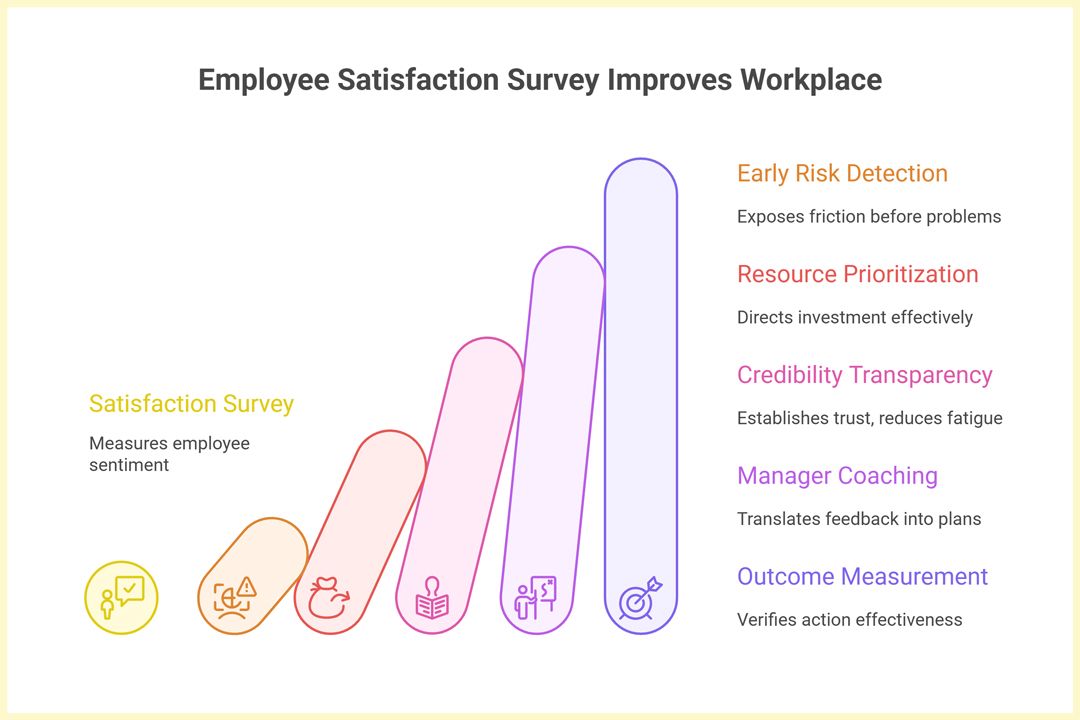
Early risk detection. Item trends (e.g., workload manageability, role clarity) expose friction months before attrition or performance dips appear.
Resource prioritization. Quantified gaps direct investment toward the highest return areas—manager enablement, tooling, or process design—rather than broad, unfocused initiatives.
Credibility through transparency. Clear scope, anonymity by default, and a published “We heard / We’ll do” summary after each cycle establish trust and reduce survey fatigue.
Manager-specific coaching. Theme and item cuts (feedback quality, recognition, communication) translate directly into targeted development plans.
Outcome measurement. A baseline followed by a 6–8 week pulse verifies whether actions landed, enabling course correction without waiting for annual reviews.
Satisfaction surveys are not an end in themselves; they are an operating mechanism to prioritize the next two improvements, validate impact quickly, and institutionalize a credible feedback loop.
Important Types of Employee Satisfaction Surveys
Not every moment calls for a full census. Selecting the right survey type—baseline, pulse, lifecycle, or deep-dive—protects employee goodwill, improves data quality, and speeds decisions. In the next table, you’ll see when each format shines, how long it should be, and the cadence that keeps momentum without fatigue.
The core lineup (what to run, when)
| Type | Purpose | Length | Best Cadence | Use When | Notes |
|---|---|---|---|---|---|
| Baseline / Census | Full read of satisfaction across themes (role, manager, tools, well-being). | 20–30 items | 1× / year | You need broad benchmarks and leadership alignment. | Anchor for year; compare pulses against it. |
| Pulse | Quick temperature check on top priorities after actions. | 5–10 items | Every 6–8 weeks | You shipped fixes and need to verify impact. | Rotate 1–2 items in; keep it short. |
| Lifecycle — Onboarding | How new hires experience the first 30–90 days. | 10–15 items | Day 30 / 60 / 90 | You’re hiring fast or seeing early churn. | Triggered by start date; automate reminders. |
| Lifecycle — Exit | Understand reasons for leaving and hotspots. | 8–12 items | Rolling (on exit) | Turnover is rising or clustered. | Keep anonymous where culture requires; summarize themes only. |
| Thematic Deep-Dive (e.g., Manager Support, Tools & Systems) | Go deeper on one friction area flagged by prior runs. | 10–15 items | Ad-hoc after a flag | Baseline or pulse exposed a weak theme. | Add 1–2 open texts for concrete blockers. |
| eNPS Add-On | Simple advocacy signal (0–10) + “why?” | 1 item (+ text) | Bundle with baseline/pulse | You need a quick headline metric for execs. | Don’t treat eNPS as the whole story. |
| Micro-Pulse (Team-specific) | Team-level nudge on a single change. | 3–5 items | 2–4 weeks after change | You rolled out a policy/tool in one unit. | Great for fast feedback loops. |
How to choose quickly
If you need a north star this year → run a Baseline now, then Pulses to track fixes.
If hiring or churn is the pain → add Onboarding and Exit to your workflow.
If one theme is bad → schedule a Deep-Dive on that theme only (keep momentum).
If leaders want one number → include eNPS as a tile, not the strategy.
Setup tips in Porsline (practical)
Start from the Employee Satisfaction Survey Template, then duplicate it into “Baseline,” “Pulse,” or “Onboarding” variants.
Use Conditional Logic to keep pulses lean (show only the top 5 priority items).
Apply Smart Routing to skip open-text for respondents who indicate “all good.”
In Reports & Dashboards, group by survey type to see trendlines across Baseline → Pulses.
Set Email Notifications only for risk signals (e.g., low well-being + negative comment) to avoid alert fatigue.
Pick one anchor (Baseline), one heartbeat (Pulse), and one lifecycle point (Onboarding or Exit). That trio covers 80% of use cases without burning time or trust.
Employee Satisfaction Survey Questions
Good survey design is about clarity, not length. The right questions create trust, expose friction, and deliver patterns you can act on immediately—without survey fatigue.
Core question framework
Keep it concise: 15–20 closed items plus 1–2 open texts. Use a 5-point Likert scale (Strongly disagree → Strongly agree) for comparability across cycles.
| Type | Purpose | Length | Best Cadence | Use When | Notes |
|---|---|---|---|---|---|
| Baseline / Census | Full read of satisfaction across themes (role, manager, tools, well-being). | 20–30 items | 1× / year | You need broad benchmarks and leadership alignment. | Anchor for year; compare pulses against it. |
| Pulse | Quick temperature check on top priorities after actions. | 5–10 items | Every 6–8 weeks | You shipped fixes and need to verify impact. | Rotate 1–2 items in; keep it short. |
| Lifecycle — Onboarding | How new hires experience the first 30–90 days. | 10–15 items | Day 30 / 60 / 90 | You’re hiring fast or seeing early churn. | Triggered by start date; automate reminders. |
| Lifecycle — Exit | Understand reasons for leaving and hotspots. | 8–12 items | Rolling (on exit) | Turnover is rising or clustered. | Keep anonymous where culture requires; summarize themes only. |
| Thematic Deep-Dive (e.g., Manager Support, Tools & Systems) | Go deeper on one friction area flagged by prior runs. | 10–15 items | Ad-hoc after a flag | Baseline or pulse exposed a weak theme. | Add 1–2 open texts for concrete blockers. |
| eNPS Add-On | Simple advocacy signal (0–10) + “why?” | 1 item (+ text) | Bundle with baseline/pulse | You need a quick headline metric for execs. | Don’t treat eNPS as the whole story. |
| Micro-Pulse (Team-specific) | Team-level nudge on a single change. | 3–5 items | 2–4 weeks after change | You rolled out a policy/tool in one unit. | Great for fast feedback loops. |
A professional satisfaction survey balances structure and humanity: just enough data for rigor, just enough space for voice.
How to create an Employee Satisfaction Survey in Porsline (Step-by-Step)
A good tool should simplify—not complicate—the process. With Porsline, HR teams can design, launch, and analyze an employee satisfaction survey in under an hour while automating most of the follow-up.
Step-by-Step (professional workflow)
Before You Start
Sign up or log in to Porsline. Choose one of two fast paths:
Start from a ready-made template. Open the Employee Satisfaction Survey Template from the library, click Use this template, then tailor branding (logo/colors), anonymity, and the question set to your teams and regions.
Build from scratch. Create a blank form, add fields one by one (Likert scales, multiple choice, open text), and use Conditional Logic and Smart Routing to shape the flow.
Either way, you can publish instantly—no coding, no installs.
- Start from the ready template
Create the Employee Satisfaction Survey and rename by unit or region (e.g., “ESAT — Sales — Q4”). This preserves a clean baseline while enabling local tweaks. Branding & access
Add your logo and colors, set Access (open link or domain-restricted), and make it Anonymous responses for company-wide runs. Turn on the progress bar and set a visible closing date.Customize questions (stay lean)
Keep the core set (15–20 items). Add 2–4 role-specific questions per function (Sales, Engineering, Ops) only if they directly inform action. Maintain a consistent 5-point Likert scale across items.Apply logic
Display follow-ups only when relevant (e.g., if Workload ≤ 3, trigger: “Which factor affects workload most?”). This shortens completion time and strengthens data qualityUse piping for context
Reuse known inputs to personalize wording (e.g., reference the selected team name in a follow-up). Piping increases clarity without adding extra items.Configure notifications & alerts (signal, not noise)
Enable Email Notifications to HR only for high-risk patterns (eNPS ≤ 6 and negative open text).Pilot, then launch
Soft-launch with one team for 24–48 hours to catch wording or logic issues. After fixes, share company-wide with a clear deadline and a two-line leadership note.Read results in dashboards & filters
Use Results Section to slice by team, tenure, and location. Suppress small segments (e.g., N < 5) to protect identity. Track ±10-point shifts versus last cycle.Close the loop
Publish a short recap—“What we heard / What we’ll do”—within two weeks. Assign owners and due dates. Schedule a pulse survey in 6–8 weeks to verify impact.
Pro tips (quick wins)
Keep the total time ≤ 8 minutes; remove anything that doesn’t drive a decision.
Limit open-text to 2–3 prompts; add one attention check if needed.
Document one action owner per theme (Workload, Tools, Manager Support) before you publish results.
Listening is the easy part; acting is where trust grows. A focused employee satisfaction survey template—run on a predictable cadence, paired with clear updates—turns scattered opinions into a shared plan. Start small, protect anonymity, publish the “we heard / we’ll do” note, and schedule a light pulse to confirm progress.
Launch your first version on Porsline, keep it under 8 minutes, and let dashboards guide the next two fixes—not the next 20.
Start Your Free Survey Trial on Porsline
FAQs — Employee Satisfaction Survey Template
How many questions should an employee satisfaction survey include?
Aim for 15–20 items plus 1–2 open-text prompts. That’s a ~5–8 minute experience with solid signal.
How often should we run employee satisfaction survey?
Twice a year for the full survey, with a short pulse (5–7 items) 6–8 weeks after actions to verify impact.
Should responses be anonymous?
Default to anonymous for company-wide runs. Use identifiable feedback only for small pilots or opt-in coaching—state this clearly upfront.
What scale works best?
A consistent 5-point Likert (Strongly disagree → Strongly agree) keeps analysis simple and comparable over time.
How do we improve response rates of employee satisfaction survey?
Keep it short, set a clear deadline, ask leaders to post a 2-line endorsement, and share results + actions within two weeks.
What’s the difference between satisfaction and engagement surveys?
Satisfaction tracks comfort and conditions; engagement tracks energy and advocacy. Many teams run both across the year—this article focuses on satisfaction.


