Online Job Application Form Template
An online job application form makes recruitment faster and smarter. Collect skills, experience, and resumes in one place—while automating emails to the right department.
Hiring the right person often depends on the very first step: the job application form.
Imagine you’re recruiting a digital marketing executive. Instead of sorting through scattered CVs, you receive structured answers in one form—skills with Google Analytics, experience in content creation, even expected salary.
With an online job application form, HR managers and team leads can:
-
Collect consistent information from every applicant.
-
Compare responses side by side.
-
Automatically route applications to the right department.
This saves hours of manual work and ensures no promising candidate slips through the cracks.
A digital-first job application form transforms hiring from a messy inbox task into a streamlined, trackable process.
What is an Online Job Application Form?
An online job application form is a structured digital document that employers use to collect candidate details, skills, and qualifications during recruitment.
Unlike CVs, which vary in format, online forms standardize data. This makes screening fairer and faster, especially when multiple applicants compete for the same role.
Typical information captured includes:
-
Personal details (name, email, LinkedIn profile)
-
Work history and key achievements
-
Skills or tool proficiency (e.g., Google Analytics, Ads)
-
Motivation for applying and salary expectations
For HR managers, this consistency supports better comparisons and reduces bias, while also integrating smoothly into applicant tracking systems (ATS).
Online job application forms give HR managers structured, comparable data, enabling faster and more objective hiring decisions.
Start Your Free Form Trial on Porsline
How an Online Job Application Form Improves Hiring Outcomes
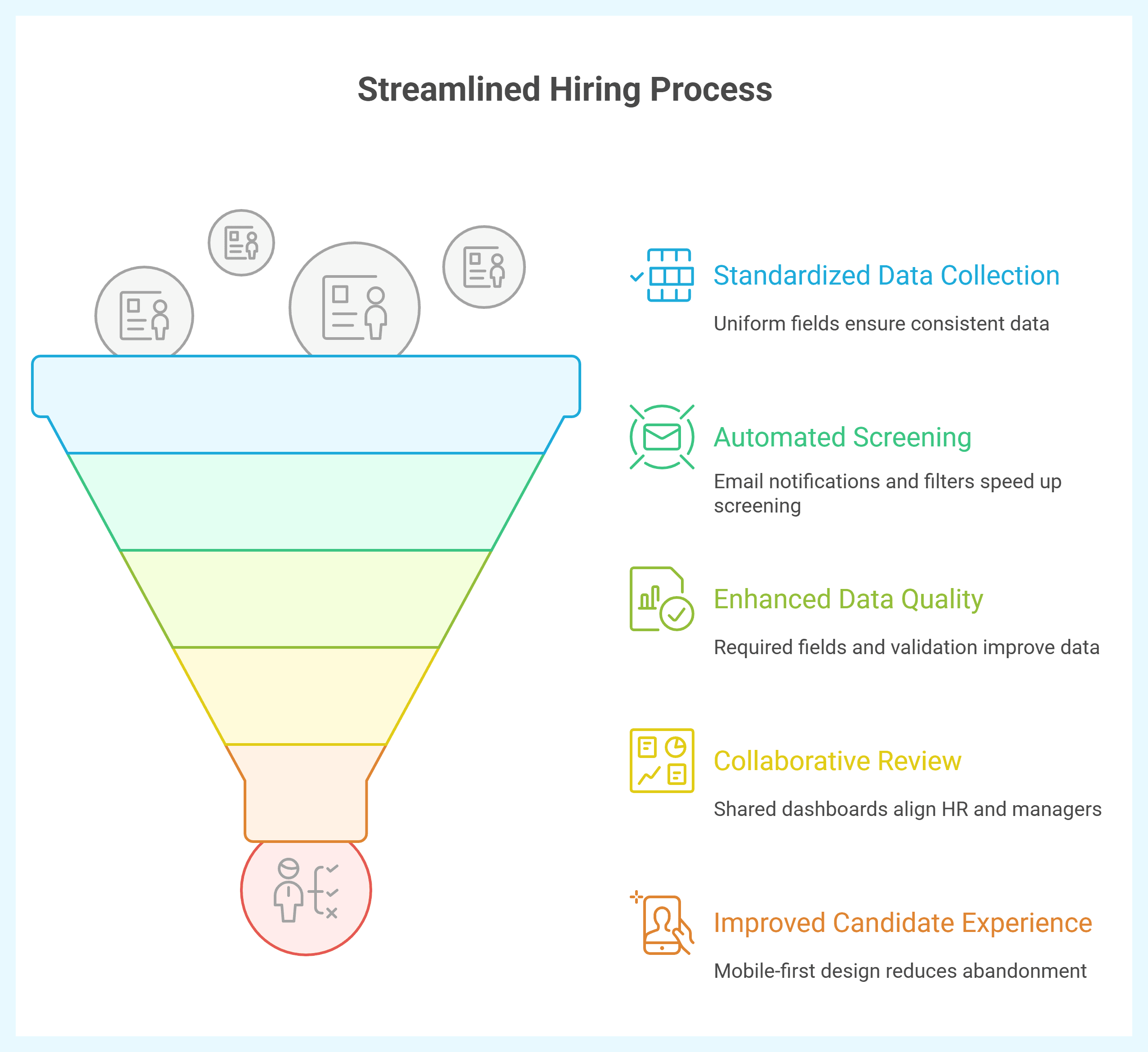
An online job application form reduces friction for candidates and cuts busywork for HR. Standardized fields and automated routing mean faster screening, fewer errors, and cleaner data for decisions.
-
Consistency for fairer screening: Uniform fields (contact, skills, experience, motivation) enable apples-to-apples comparisons and reduce format bias.
-
Speed & automation: Email notifications to hiring managers, labels by role/department, and instant filters shorten time-to-screen and time-to-interview.
-
Higher data quality: Required fields, validation (email/phone), and controlled options (skill levels, yes/no) reduce noise and improve reporting.
-
Collaboration built-in: Shared dashboards and comments keep HR and line managers aligned on shortlists—no messy email threads.
-
Better candidate experience: Mobile-first pages and clear progress cues lower abandonment, especially for first-touch roles.
-
Compliance & traceability: Timestamped submissions, explicit consent text, and exportable logs support audits and fair-hiring standards [High-authority HR compliance reference — Placeholder].
Behavioral impact:
Prompts for concrete achievements encourage evidence-based claims; proficiency scales curb over/under-statement; “what’s next” microcopy reduces applicant anxiety and follow-up emails.
This template turns CV chaos into clean, comparable, compliant data—so teams move faster and hire with more confidence.
Types and Variants of an Online Job Application Form
Below are practical variants you can spin up in minutes—each with a clear use case.
1) Short Apply (1–2 minutes)
-
Purpose: Maximize starts from passive candidates on mobile.
-
Best for: High-volume roles (retail, support, interns).
-
Key fields: Name, email/phone, role of interest, LinkedIn/CV upload, 2–3 knockout questions.
2) Standard Application (Core HR baseline)
-
Purpose: Balanced depth for fair comparisons.
-
Best for: Most roles.
-
Key fields: Personal info, experience, top achievement, skills matrix, availability, compensation range, consent.
3) Skills-First Application
-
Purpose: Prioritize capabilities over pedigree.
-
Best for: Digital/technical roles.
-
Key fields: Tool proficiency scales, portfolio/GitHub links, case prompt or mini-task, preferred stack/methods.
4) Screening + Auto-Route
-
Purpose: Route by department/location automatically.
-
Best for: Multi-site or multi-team hiring.
-
Key fields: Location, team/function, work authorization, shift preference; routing rules for notifications.
5) Senior/Leadership Track
-
Purpose: Evaluate scope and outcomes at higher levels.
-
Best for: Managers, heads, directors.
-
Key fields: Team size, budget ownership, strategy examples, KPI deltas, stakeholder management scenarios.
6) Compliance-Enhanced (Regulated sectors)
-
Purpose: Capture required declarations and consents.
-
Best for: Healthcare, finance, education, government contractors.
-
Key fields: Background disclosures, license numbers, policy acknowledgments, data-processing consent.
7) Campus/Graduate Intake
-
Purpose: Standardize large cohorts.
-
Best for: Interns, fresh grads.
-
Key fields: University, graduation date, GPA (optional), projects/competitions, relocation openness, program preferences.
Essential Questions for a Job Application Form
A well-designed job application form asks just enough to filter and compare candidates without scaring them off. The questions below cover identity, skills, and motivation in a structured way.
| Question | Type | Purpose |
|---|---|---|
| Full name (as in ID) | Short text | Match identity across documents and systems |
| Email address | Primary contact; enables notifications/OTP if used | |
| Mobile number (with country code) | Short text(Phone) | Interview coordination and urgent follow-ups |
| LinkedIn or portfolio URL | Short text | Quick credibility scan; work samples |
| Role you’re applying for | Dropdown | Standardize routing and reporting by role |
| Current location & work authorization | Dropdown + Yes/No | Eligibility, relocation, and compliance |
| Earliest start date | Short text(Date) | Planning onboarding timelines |
| Years of relevant experience | Short text(Numeric) | Fast seniority screen |
| Top achievement (metrics if possible) | Long text | Evidence of impact (STAR stories) |
| Tool proficiency (e.g., Google Analytics, Ads, Excel) | Multiple Choice | Comparable skills matrix across candidates |
| Preferred work type (onsite/hybrid/remote) | Multiple Choice | Fit with team policy and logistics |
| Salary expectation (monthly/annual; currency) | Short text(Numeric)+ dropdown | Early alignment to avoid late-stage drop-off |
| Why do you want to work here? | Long text | Motivation and culture fit signal |
| Past roles: title, employer, dates, key results | Question Group | Structured work history without messy CV parsing |
| Referees (name, role, contact) | Question Group (optional) | Reference readiness for finalists |
| Upload CV/resume (PDF/Doc) | File upload | Source document for detailed review |
| Consent to data processing and verification | Multiple Choice | Legal compliance and audit trail |
The right mix of short, scaled, and open-ended questions ensures fairness and gives HR enough context to shortlist quickly.
How to Build the Job Application Form in Porsline (Step-by-step Build Guide)
Creating a professional job application form in Porsline takes minutes. The platform lets you combine conditional logic, branding, and instant reporting in one flow.
Step-by-step build guide:
-
Create a new form
-
Log into Porsline and select Create new survey.
-
Choose a blank template or adapt an existing HR template.
-
-
Add core fields
-
Short text for name.
-
Dropdown for role applied.
-
File upload for CV/resume.
-
-
Apply logic
-
Show extra questions (e.g., relocation, licenses) only if relevant.
-
Route candidates to different question paths by role/department.
-
-
Enable skip logic
-
Hide irrelevant sections (e.g., salary only for full-time roles).
-
Keep forms shorter for better completion rates.
-
-
Use piping for personalization
-
Auto-insert candidate’s name into later questions (“Thanks, "@" {{First Name}}”).
-
Makes the form feel more human.
-
-
Set identity or anonymity
-
Add OTP/email verification for security.
-
Or keep anonymous if used for internal trial roles.
-
-
Automate notifications
-
Trigger emails to HR or department heads when a form is submitted.
-
Send confirmation emails to candidates instantly.
-
-
Brand your form
-
Add company logo, colors, and background.
-
Align with employer branding.
-
-
Publish and share
-
Generate a shareable link or QR code.
-
Embed the form on your careers page or LinkedIn post.
-
-
View instant reports
-
Access dashboards, filter by role, or export to Excel/CSV.
-
Use charts to compare candidate skills at a glance.
Porsline makes it simple to build, customize, and launch a job application form that saves HR time while improving candidate experience.
Start Your Free Form Trial on Porsline
FAQ - Online Job Application Form
How do I create an online job application form?
Log into a form builder like Porsline, add fields (personal info, skills, CV upload), apply logic, and publish via link or embed.
What should be included in a job application form?
Core details: name, contact info, work history, skills, motivation, references, and consent to data use. Optional: salary expectations, portfolio links.
Is there a free job application form template?
Yes. Porsline offers a free job application form template that HR teams can customize and share instantly.
Why use an online job application form instead of CVs?
Forms standardize data, reduce screening bias, support automation, and integrate smoothly into HR workflows—saving time and improving consistency.
How do employers use job application forms?
They screen applicants fairly, route submissions to managers, compare candidates side-by-side, and maintain audit-ready hiring records.
Can I customize the job application form?
Yes. Add/remove questions, apply conditional logic, and brand the design with your logo and colors in Porsline.
Are online job application forms legally binding?
The form itself isn’t a contract, but it can include binding consents (e.g., data processing, policy acknowledgment). The employment contract is signed separately.
What documents should applicants upload?
Typically, a CV/resume. Some employers also request references, proof of qualifications, or portfolios.


