Have an idea for a survey, form, or quiz but don't want to write every question from scratch?
A clear AI prompt can help you describe what you want to create, who it is for, what you want to learn or collect, and any requirements that matter.
This guide gives you ready-to-use AI survey prompts that you can copy and adapt by replacing the information in [square brackets]. The examples cover customer satisfaction, registration, market research, HR, quizzes, assessments, and other common use cases.
If you first want to learn how to create a survey with AI in Porsline, see Create a Survey with AI in Porsline.
How to Write a Good AI Survey Prompt
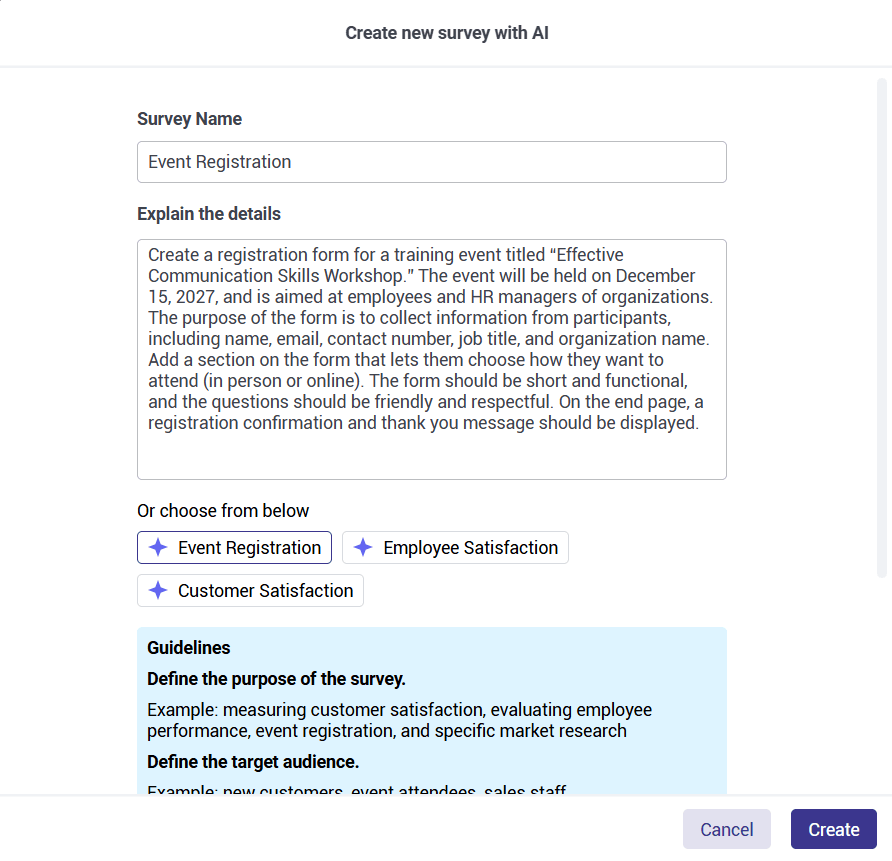
A good prompt does not need to be long or technical. What matters is giving AI the information that genuinely affects the survey, form, or quiz you want to create.
Use the following steps as a guide. You do not need to include every detail in every prompt.
1. Define What You Want to Create
Start by specifying the type of content you need.
For example:
- Customer satisfaction survey
- Registration form
- Online quiz
- Evaluation form
- Market research survey
Example:
“Create a customer satisfaction survey.”
2. Explain the Goal
Describe what you want to learn, measure, collect, or accomplish.
This is the most important part of the prompt because it gives the questions a clear purpose.
Example:
“The goal is to measure customer satisfaction after an interaction with the support team.”
3. Define the Target Audience
Explain who will answer the questions whenever the audience affects the wording, topics, or level of detail.
Example:
“The survey is for customers who contacted the support team during the past month.”
4. Specify the Topics to Cover
List the main areas the survey should address instead of leaving the subject too broad.
Example:
“Cover ease of reaching support, response time, clarity of communication, issue resolution, and overall satisfaction.”
5. Set the Number of Questions When It Matters
You do not always need to specify the number of questions.
Add an approximate length when you want to control how much time the survey takes or how detailed it should be.
Example:
“Keep the survey to around 6 to 8 questions.”
6. Specify Question Types When Necessary
Let AI choose an appropriate structure unless a particular question type matters to the data you want to collect.
Example:
“Use rating questions and include one open-ended question for additional comments.”
7. Add Important Constraints
Explain anything the survey should avoid or take into account.
For example:
- Keep the questions neutral and non-leading.
- Avoid asking the same thing in different ways.
- Do not request unnecessary personal information.
- Use language that is appropriate for the audience.
8. Define the Tone When It Affects the Respondent Experience
You can specify the writing style when it is relevant to the context.
For example:
- Professional
- Simple
- Friendly
- Neutral
- Educational
Example: Turning a General Prompt into a Clearer One
Instead of:
“Create a customer satisfaction survey.”
Write:
“Create a survey to measure customer satisfaction after an interaction with the support team. The survey is for customers who used the support service during the past month. Focus on ease of reaching support, response time, clarity of communication, issue resolution, and overall satisfaction. Keep the survey to around 6 to 8 questions, use short and neutral wording, and include one open-ended question for comments.”
A Simple AI Survey Prompt Template
If you're not sure where to start, adapt this structure:
“Create a [survey/form/quiz] to [goal]. The target audience is [audience]. Cover [key topics]. Keep it to around [number of questions] if length matters. Use [question types] where useful, follow [constraints or requirements], and use a [tone] tone.”
You do not need to include every element every time.
Start with the goal, audience, and main topics, then add other requirements only when they affect the result.
Ready-to-Use Prompts for Registration and Consultation Forms
When the goal is registration or an initial enquiry, collect only the information needed to complete the process or understand the request.
| Use Case | Ready-to-Use Prompt |
|---|---|
| Event registration | Create a registration form for an event called [event name]. Collect the information needed to confirm registration, communicate with participants, and organise attendance. If useful, include a question about attendance format or practical requirements. Keep the form short and easy to complete. |
| Training course registration | Create a registration form for a training course called [course name]. Collect the information needed for registration, and add a small number of questions to understand participants' backgrounds and current knowledge when that will help with preparation. Use clear, professional language and avoid unnecessary questions. |
| Workshop registration | Create a registration form for a workshop about [workshop topic]. Collect the information needed for registration and communication, and add one or two questions to understand participants' expectations and current familiarity with the topic. Keep the form concise and practical. |
| Competition registration | Create a registration form for a competition called [competition name]. Collect the information needed to register the participant, communicate with them, and confirm eligibility where necessary. Organise the questions clearly and avoid requesting information that does not support the registration process. |
| Consultation request | Create a consultation request form for [type of consultation]. The goal is to understand the applicant's needs before contacting them. Collect the necessary contact information, then add a limited number of questions about the problem or objective and the preferred way to communicate. Avoid requesting information that is not needed at this stage. |
AI Survey Prompts for Customer Satisfaction and Customer Experience
For customer feedback, avoid relying only on a general satisfaction question. Define the parts of the experience you actually want to understand.
| Use Case | Ready-to-Use Prompt |
|---|---|
| E-commerce customer satisfaction | Create a survey to measure customer satisfaction after receiving an order from an online store that sells [product type]. Evaluate the purchasing experience, clarity of product information, product quality, delivery experience, customer service, and overall satisfaction. Keep the survey concise and add one optional open-ended question for improvement suggestions. |
| Restaurant customer satisfaction | Create a short survey for restaurant customers after a visit or order delivery. Evaluate food quality, range of options, speed of service, staff interaction, cleanliness, and the overall experience. Add a question about likelihood to return and an optional space for comments. |
| Customer service evaluation | Create a survey for customers who recently contacted the customer service team. Evaluate ease of reaching support, response time, understanding of the issue, clarity of communication, effectiveness of the resolution, and final satisfaction. Keep the questions neutral and include an optional space for improvement suggestions. |
| Hotel guest satisfaction | Create a survey for hotel guests after their stay. Evaluate check-in and check-out, room cleanliness, comfort, facilities, staff interaction, and services used. Add a question about the overall experience and likelihood to choose the hotel again. |
| App user experience | Create a survey for users of [app name]. Evaluate ease of use, interface clarity, core functions, performance and stability, and the value users receive from the app. Add an open-ended question asking which improvement would matter most to them. |
| Customer journey evaluation | Create a survey to evaluate the customer journey with [company or service name], from initial awareness through purchase and use to post-purchase support. Help identify which stages are easy, where friction exists, and which areas need improvement. Avoid asking the same question in different ways. |
AI Survey Prompts for Market Research
Market research questions should be as neutral as possible.
Avoid prompts that assume people already want the product, prefer the brand, or agree with the idea being tested.
| Use Case | Ready-to-Use Prompt |
|---|---|
| Interest in a new product | Create a market research survey to explore potential customer interest in a new product: [product description]. I want to understand the problem people are currently trying to solve, the solutions they use today, the factors that influence purchase decisions, the features that matter to them, and their level of interest in trying the product. Use neutral questions and do not assume the product is already desirable. |
| Purchase behaviour analysis | Create a survey to analyse the purchasing behaviour of customers of [business type]. Cover purchase frequency, channels used, factors that influence choice, the importance of price, quality and brand, and the purchasing experience. Distinguish between questions about actual behaviour and questions about opinions or preferences. |
| Brand awareness | Create a survey to measure awareness of [brand name] among [target audience]. I want to understand which brands people remember in this category, how familiar they are with our brand, where they encountered it, and what impressions they associate with it. Do not assume that all respondents already know the brand. |
| Customer segmentation | Create a market research survey to help understand different groups of customers of [company name]. Collect information about needs and problems, usage patterns, purchasing behaviour, priorities, and factors that influence decisions. Make the questions suitable for later comparison between groups with different needs and behaviours, and avoid collecting unnecessary personal information. |
| Product packaging evaluation | Create a survey to evaluate a new package design for [product name]. Assess clarity of information, ease of recognising the product, visual impression, fit with the brand, and ease of use. Add an open-ended question about the single most important change that could improve the packaging. |
| Demand for a new service | Create a survey to study the need for a new service: [service description], before launch. I want to understand how customers currently deal with the problem, how important it is, what they expect from a solution, which features matter, and what might prevent them from using the service. Keep the questions neutral and non-promotional. |
AI Prompts for HR and Employee Surveys
For HR forms and surveys, define the purpose clearly so the form does not collect information that the process or decision does not actually require.
| Use Case | Ready-to-Use Prompt |
|---|---|
| Job application form | Create a job application form for a [job title] position. Collect the information needed for initial screening, such as relevant experience, core skills, qualifications, and contact details. Include only the professional questions needed to assess initial fit. Keep the form organised and professional. |
| Employee satisfaction | Create a survey to measure employee satisfaction within the organisation. Cover the work environment, relationship with the manager, team collaboration, development opportunities, work-life balance, recognition, and overall satisfaction. Use neutral questions that allow employees to express their views without steering them. |
| Employee performance evaluation | Create a form for a manager to evaluate an employee's performance during [period]. Cover goal achievement, quality of work, meeting deadlines, accountability, collaboration, communication, problem solving, and initiative. Include short spaces to document strengths and development priorities. |
| Exit interview | Create an exit interview survey for employees who are leaving the organisation. I want to understand their experience at work, reasons for leaving, and views on management, the work environment, development opportunities, and organisational culture. Keep the questions neutral and respectful and include an optional space for comments. |
| Training needs assessment | Create a survey to identify employee training needs. I want to understand which skills employees need to develop, their current level of knowledge, priority training topics, preferred learning methods, suitable training times, and factors that could prevent participation. |
| 360-degree manager feedback | Create a 360-degree feedback form to evaluate [management role]. Cover leadership, communication, clarity of direction, decision making, team support, delegation, and conflict management. Use neutral, behaviour-based wording and include an optional space for qualitative comments. |
| New employee information | Create a form to collect the information needed from a new employee when they join. Collect only the data HR needs to complete onboarding, communication, and setup. Organise the information into clear sections and include file upload only if it is part of the process. |
| Workplace burnout indicators | Create an internal survey to explore indicators associated with workplace burnout, such as energy levels, work pressure, ability to recover after working hours, motivation, and feelings of detachment from work. Use sensitive, neutral, non-judgemental language and do not present the responses as a medical diagnosis. |
| Incident or misconduct report | Create a form for reporting an incident or misconduct in the workplace. Collect the date and location, type of incident, description of what happened, relevant parties and witnesses if applicable, and any actions already taken. Organise the questions to support follow-up without assuming responsibility or leading the person making the report. |
AI Prompts for Quizzes and Assessments
When creating a quiz or assessment, define what you want to measure.
The questions may need to test knowledge, understanding, application, or problem solving rather than simple recall.
| Use Case | Ready-to-Use Prompt |
|---|---|
| Digital marketing quiz | Create a medium-difficulty quiz on digital marketing fundamentals for beginners. Cover SEO, content marketing, social media, digital advertising, email marketing, and conversion rates. Use a mix of knowledge questions and practical scenarios that require participants to choose the most appropriate action. |
| English placement test | Create an English placement test that distinguishes between different learner levels. Distribute the questions across grammar, vocabulary, and reading comprehension, and gradually increase the difficulty from easy to advanced. Write the questions and answer choices in natural English. |
| Specialist recruitment test | Create a test to evaluate candidates for a [job title] position. Focus on knowledge and skills that are genuinely related to the role, and include situations or problems similar to what the employee may face at work. Avoid relying on memorisation when it is not relevant to actual performance. |
| End-of-course quiz | Create an end-of-course quiz about [topic]. The goal is to assess participants' understanding of the key concepts and their ability to apply them. Distribute the questions across the main course topics and balance conceptual understanding with practical application. |
| General knowledge contest | Create a general knowledge contest about [topic]. Include a mix of easy, medium, and difficult questions. Make sure each question has one verifiable correct answer and use plausible incorrect options without making the question ambiguous. |
| Science contest for students | Create a science contest for students in [grade or school level] about [topic]. Make the language and concepts appropriate for their age and learning level. Include questions that assess understanding, application, and everyday situations. Increase the difficulty gradually and avoid terminology beyond the intended level. |
| Workplace safety quiz | Create a quiz for employees in [type of workplace] to assess their knowledge of safety practices relevant to their work. Cover recognising hazards, protective equipment, emergency response, incident reporting, and preventive measures. Use practical scenarios where appropriate. |
AI Prompts for Other Common Forms and Surveys
Not every form needs to be a long questionnaire.
In many cases, the goal is simply to collect the minimum information required to complete a specific process.
| Use Case | Ready-to-Use Prompt |
|---|---|
| Contact form | Create a contact form for a company website that offers [service or product]. Collect only the contact information, message topic, and request description needed to understand and respond to the enquiry. Keep the form short and avoid unnecessary information. |
| Technical support request | Create a form for users of [product or service] to submit technical support requests. Collect a description of the issue, when it started, the context in which it occurred, and the information needed to begin investigating it. Include the option to attach an image or file when that would help explain the problem. |
| Newsletter subscription | Create a very short newsletter subscription form for [topic or company]. Ask only for the information needed to manage the subscription. If content personalisation matters, add an optional choice of topics the subscriber is interested in. |
| Partnership or sponsorship request | Create a form for receiving partnership or sponsorship requests from companies and organisations. Collect information that helps the team understand the organisation, the proposal, the goal of the collaboration, its scope, and expected timeframe. Organise the questions so the team can review different requests consistently. |
| Content feedback | Create a short survey to collect feedback on [article/video/podcast episode/guide]. Evaluate how useful and clear the content was and how well it matched the audience's needs. Add a question about the most useful part and an optional question about improvements or future topics. |
| Appointment booking | Create a form for booking an appointment for [type of service]. Collect the information needed to choose the service, preferred date or time, and contact the applicant. Keep the choices clear and do not ask for details the booking team does not need before the appointment. |
| Report a problem or fault | Create a form for reporting a problem or fault in [website/facility/service]. Collect the type of issue, location, time it was noticed, description, and urgency level if relevant. Include the option to attach an image or file when needed. |
| Event evaluation | Create a survey for participants after an event called [event name]. Evaluate the quality of the content, sessions or speakers, organisation, schedule, venue or attendance platform, and how well the event met expectations. Add a question about topics participants would like to attend in the future and an optional improvement suggestion. |
| Public facility or space evaluation | Create a survey to collect feedback from users of a [library/park/cultural centre/public facility]. Evaluate accessibility, cleanliness, comfort, quality of facilities, sense of safety, and the overall experience. Add an open-ended question about the single most important change that could improve the experience. |
Which Survey Creation Method Should You Start With?
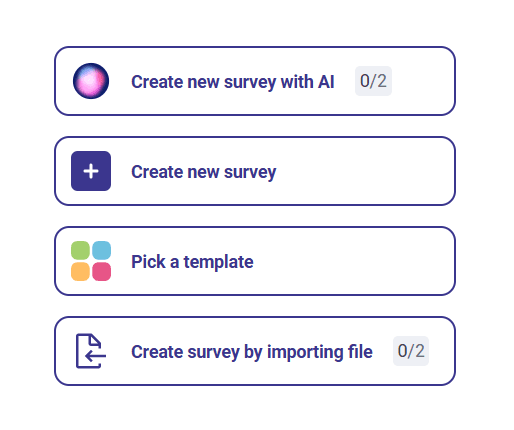
You do not need to use an AI prompt every time. Choose your starting point based on what you already have.
- You have an idea or objective, but you haven't written the questions yet:
Start with a clear prompt and use AI to create the first draft. Then review and customise the questions for your audience. - Your questions are already prepared in Word or Excel:
Use Create a Survey from a Word or Excel File in Porsline instead of rewriting or describing the questions again in a prompt. - You want to start from an existing structure:
Browse Porsline's ready-made survey and form templates, choose the closest match, and customise it for your use case. - You want full control over every question from the beginning:
Start with a blank survey and build the questions yourself.
Use the Porsline Prompt Writer Skills with ChatGPT or Claude
If you know what you want to create but are not sure how to turn the idea into a clear prompt, you can use the Porsline Prompt Writer Skills for ChatGPT or Claude.
These Skills are designed to help you turn a simple request into a clear, focused prompt for Porsline AI. They do not create the final survey, form, or quiz themselves. Instead, they help structure the information Porsline AI needs, such as the objective, target audience, key topics, important constraints, and tone.
- Download the Porsline Prompt Writer Skill for ChatGPT
- Download the Porsline Prompt Writer Skill for Claude
For example, you can start with a simple request such as:
“I want to create a survey to understand why customers are less satisfied with our delivery experience.”
The Skill will turn that request into a more complete Porsline prompt by identifying the essential context and removing unnecessary detail.
Once the final prompt is ready, use it with Porsline AI to create the first draft of your survey, then review and adjust the generated questions before sharing the survey with respondents.
Review the Survey Before You Use It
A clear prompt can help you create a better first draft, but the generated survey should still be reviewed before it is shared.
Read the survey as if you were one of the respondents.
Check that:
- Every question supports the main objective.
- The same idea is not repeated unnecessarily.
- The wording is clear and appropriate for the audience.
- The answer choices match the question.
- The questions follow a logical order.
- The survey does not request personal or sensitive information that you do not need.
- The overall length is appropriate for the time you expect respondents to spend on it.
In Porsline, you can review and edit the generated questions before publishing the survey. Adjust, remove, or add questions until the survey fits your objective and audience.
FAQs About AI Survey Prompts
What information should I include in an AI survey prompt?
Start with the survey objective, the people who will answer it, and the topics or information you want to collect.
When useful, you can also specify an approximate number of questions, preferred question types, or any important requirements.
When you create a survey with AI in Porsline, these details give the system clearer direction for the initial draft. The prompt does not need to be long; it needs to be clear and relevant to the survey's purpose.
Can I edit the ready-to-use prompts on this page?
Yes. These prompts are designed as starting points that you can adapt before using them in Porsline.
Replace the information in [square brackets] with details from your own use case, and add or remove instructions when needed.
After Porsline creates the initial survey, review the generated questions and make any necessary changes before sharing it with respondents.
When should I use an AI prompt, a ready-made template, or a Word or Excel file?
Choose the method based on what you already have.
Use an AI prompt in Porsline when you have an idea or objective but have not written the questions yet.
If a Porsline template already closely matches your use case, starting with the template may be more practical.
If your questions are already prepared in a Word or Excel file, use Porsline's file-import option instead of rewriting them inside a prompt.
Start with the Prompt Closest to Your Use Case
Choose the example that best matches your goal, replace the information in [square brackets], and use it as your starting point.
You do not need to find a “perfect prompt” before you begin.
Start with a clear request, review the first draft, and refine the details that matter for your audience and objective.