


Typeform became popular by making forms feel more like conversations than standard questionnaires. However, as businesses expand, many find that Typeform lacks the flexibility, customization, and features needed for more complex tasks.
If you’re looking for more customization, better prices, or advanced features like conditional logic and A/B testing, there are some great alternatives to consider.
Many people look for Typeform alternatives when they face limited design choices, higher costs, or want more advanced form-building options. Some competitors offer better integrations, while others help you match your brand’s look and feel.
Whether you need simple data collection or detailed surveys with branching logic, the right tool can save you time, money, and frustration.
This guide covers what really matters when picking a form builder and introduces five top Typeform competitors. You’ll see which platforms deliver the best value, which ones fit different business types, and how to figure out what’s best for you.
TL;DR: Best Typeform Alternative at a Glance
Need a quick answer? Here’s a snapshot of the top five Typeform alternatives.
| Tool | Starting Price | Free Plan | Response Limits | Best For |
|---|---|---|---|---|
| Porsline | €23/month | Yes | No limit/charge for response collected | Professionals and organizations needing multilingual forms with strong analytics |
| Tally | $24/month | Yes | Unlimited (free) | Cost-conscious creators, startups, freelancers, and small teams |
| Jotform | $34/month | Yes | 100/month (free) | Teams needing extensive integrations |
| SurveyMonkey | €30/month | Yes | 25/month (free) | Enterprises, researchers, HR/marketing |
| Paperform | $24/month | Yes | 30/month (free) | E-commerce, creators, agencies |
Each survey tool brings something different. Some focus on payment collection, others on more advanced features. Your best pick depends on your priorities.
Key Criteria When Choosing an Alternative to Typeform
To pick the best Typeform alternative, consider user experience, pricing, features, and data security. The right choice will depend on how you gather data and how your form needs might grow in the future.
- For user experience and design, choose between conversational or traditional layouts. Make sure the forms work well on mobile devices and can be customized to fit your brand.
- When looking at pricing and value, check for response limits, any hidden fees, and what upgrades you might need. Make sure the cost stays fair as your usage and team get bigger.
- For advanced features, look for options like conditional logic, calculation fields, and integrations with tools such as CRM, email, payment systems, and team collaboration platforms.
- For data management and security, check if you can export data to CSV, Excel, or Sheets. Make sure the platform follows GDPR, keeps data secure, and has clear policies about who owns the data.
- When it comes to support and resources, choose tools that offer good documentation, helpful tutorials, quick customer support, and an active user community.
Choosing a platform that balances these factors ensures long-term usability, scalability, and reliable data collection.
5 Top Typeform Alternatives in 2026 (Ranked List)
Picking the right tool can save you money and give you better ways to collect and analyze your data. Here are five strong alternatives to Typeform that help you create custom online forms and get more from your submitted responses.
- Porsline: Provides a full solution with advanced features for building unlimited forms, quizzes, and surveys in multiple languages. The analytics are strong, too. Start a free trial now.
- Tally: A solid free Typeform alternative with unlimited forms and submissions and a clean interface. You get conditional logic and answer piping at no cost.
- Jotform: Jotform is packed with features, templates and highly customizable forms. You get payment processing, PDF generation, and 100+ integrations with your favorite tools.
- SurveyMonkey: The classic choice for traditional surveys, with strong form analytics. You get benchmarking data to compare results and advanced branching logic for complex questionnaires.
- Paperform: This flexible builder lets you create conversational forms that feel more engaging. It offers robust conditional logic and payment options, so it’s great for booking forms and product orders.
Each tool brings something unique. Think about what matters most, like pricing, design flexibility, or in-depth exploration with form analytics.
Porsline
Porsline is an online form builder that lets you create surveys and questionnaires without any coding skills. More than 50,000 companies use it, and it collects data in a conversational way. You can build forms using drag-and-drop or choose from over 200 templates.
The platform is designed for customer experience management, employee engagement, and market research. It offers tools to analyze customer journey touchpoints and measure employee satisfaction.
Porsline offers over 25 question types to help you collect different kinds of data.
Start a free trial to see how it works.
Best for
Porsline is a good choice for businesses that need a complete survey tool with strong analytics. Teams looking for an easy-to-use tool with advanced features like auto-grading and conditional logic, even on the starter plan, will find it useful.
Feature list
Question types and customization
- Multiple choice, rating, slider, and Likert scale questions.
- Matrix question type for identical options.
- File upload support for photos, videos, and audio.
- Payment gateway integration.
- Custom regex patterns for basic data collection.
Smart features
- Score assignment with custom formulas.
- Conditional logic with if-then-else clauses.
- Respondent authentication and access restrictions.
- Custom variables and hidden fields.
- Response quota limits.
- Auto-grading with answer keys.
Sharing and integration
- Embed custom online forms in web pages or display as pop-ups.
- Share via social media, QR codes, or custom URLs.
- Connect with Google Sheets, Slack, WhatsApp, and Telegram.
- Automate workflows through n8n integration.
- Zapier support for 2,000+ services.
- Google Analytics and Tag Manager compatibility.
Analysis and reporting
- Real-time charts with customizable layouts.
- Response metrics and distribution statistics.
- Searchable results tables.
- Export options for detailed analysis.
- Shareable reports with custom captions.
Pricing overview
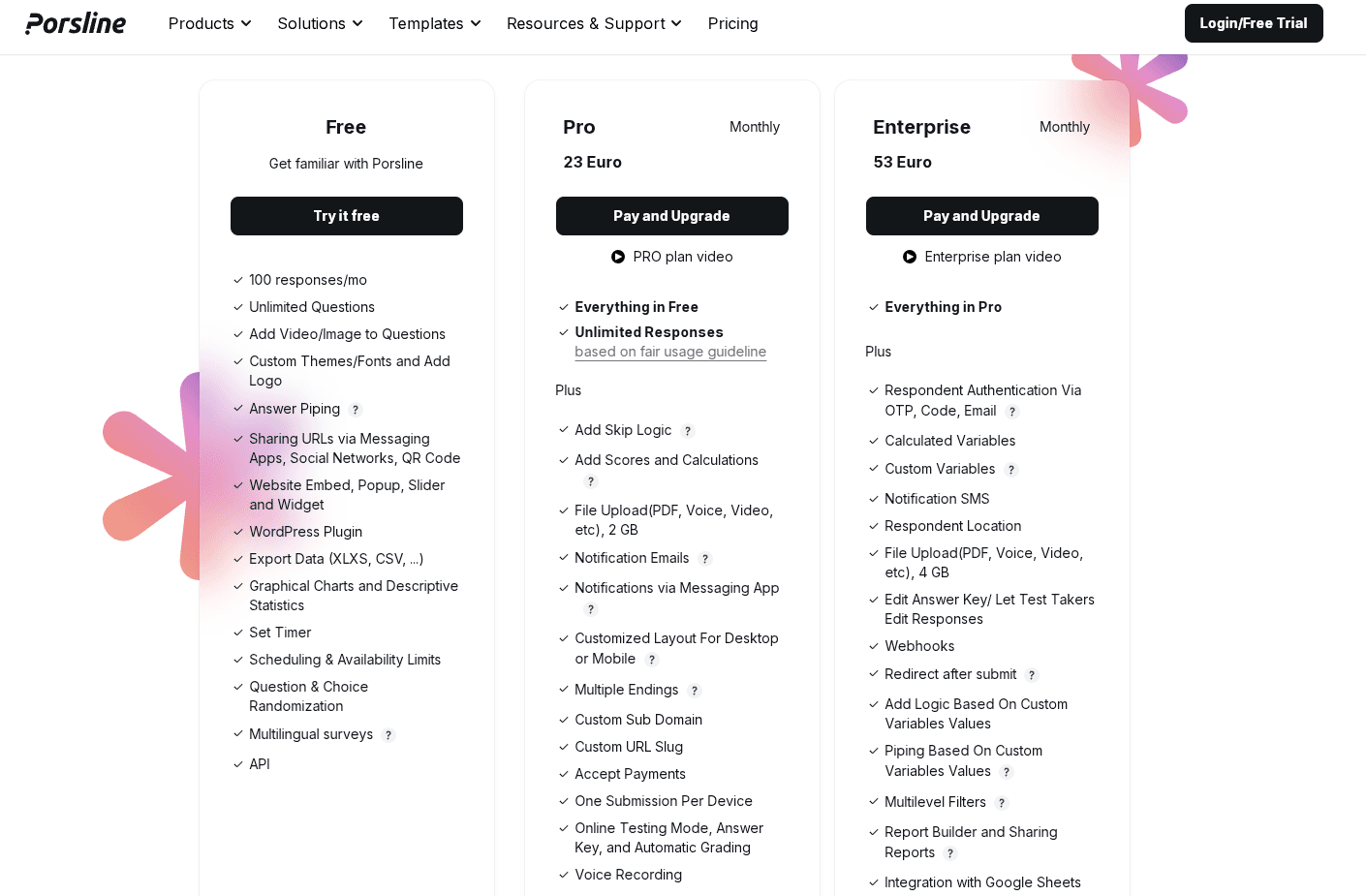
Porsline uses a straightforward tiered pricing model. The Free plan covers essential survey and form-building features. The Pro plan, starting at €23, adds unlimited responses, advanced logic, file upload support, and notification tools.
The Enterprise plan includes all Pro features plus enhanced security and control options, such as respondent authentication, webhooks, and SMS notifications. This makes it a strong choice for larger teams and organizations.
Start a free trial to test the platform and see if it fits your needs.
Tally

Tally is a form builder that feels a lot like writing in a text doc. You just type your questions right on the page, a bit like Notion. It's all about simplicity, yet somehow manages to pack in features that other form builders usually keep behind paywalls.
You get unlimited forms and form submissions, and you can still use almost all advanced features, such as conditional logic, file uploads, and payment processing.
Best for
Tally works for teams that need professional-looking forms without fussing over budgets. If you need to collect payments, run online surveys, or build lead gen forms without worrying about form response limits, it's a good option.
Feature list
- Unlimited forms and responses.
- Conditional logic to show or hide relevant questions.
- File uploads up to 10MB per submission.
- Payment processing through Stripe with no extra fees.
- Answer piping to reference previous responses.
- Calculator for pricing or scoring.
- Custom themes and design options.
- Email notifications for new submissions.
- Multi-page or single-page layouts for multiple-page forms.
- Support for over 50 languages.
Pricing overview
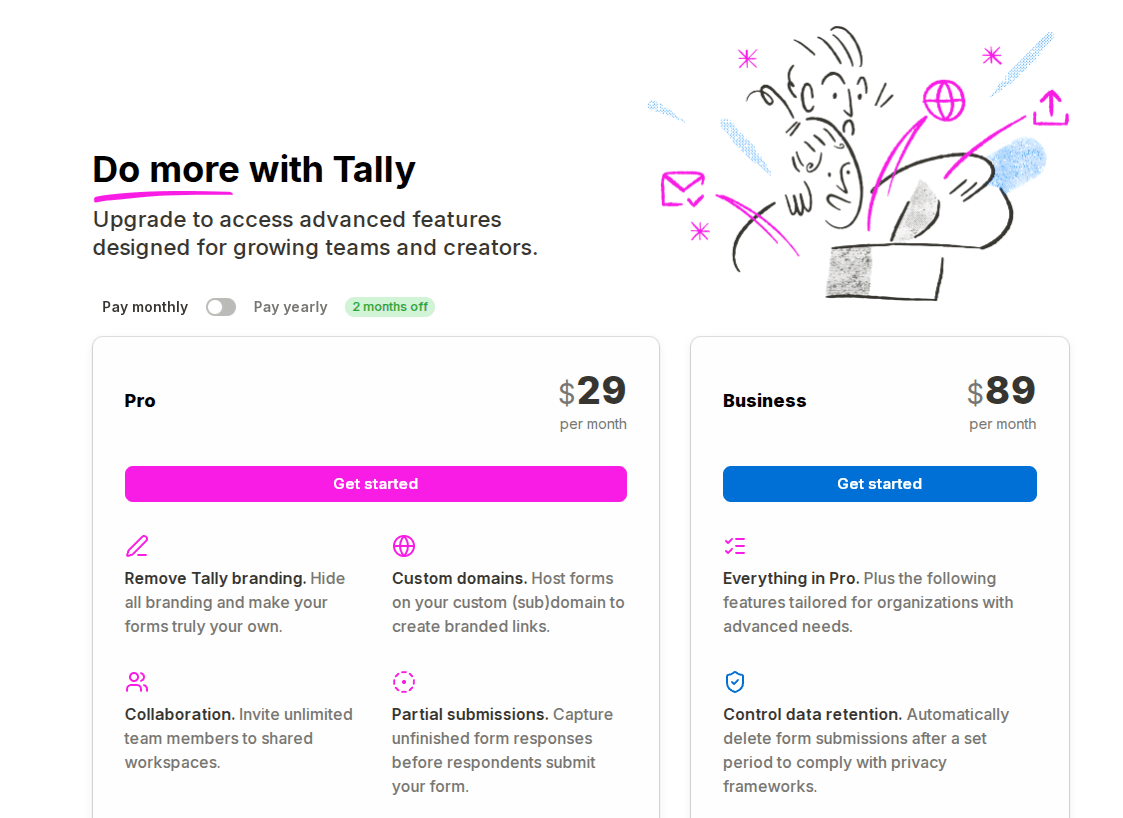
Tally offers a simple two-tier paid pricing model that scales with user needs. The Pro plan costs $29 per month and adds branding removal, collaboration, advanced customization, analytics, and premium integrations.
The Business plan costs $89 per month and includes everything in Pro, plus added data control features such as automated data retention, email verification, and a longer version history.
Jotform
Jotform lets you create professional-looking forms without coding. The drag-and-drop interface makes it easy to customize forms with your own logo, fonts, and colors. It handles everything from basic data collection to payment processing and workflow automation.
Check out Jotform alternatives to learn more.
Best for
Jotform is handy when you want ready-made templates and a quick setup. If you need to manage file uploads or automate form submissions, it's a solid option.
Feature list
- Conditional logic to show or hide questions based on previous answers.
- Payment processing across multiple providers to collect fees or donations.
- File uploads for gathering documents and images.
- 150+ integrations with email marketing, CRMs, and project management tools.
- Automated workflows that send form responses to your business apps.
- Report generation to analyze your form submissions.
Pricing overview
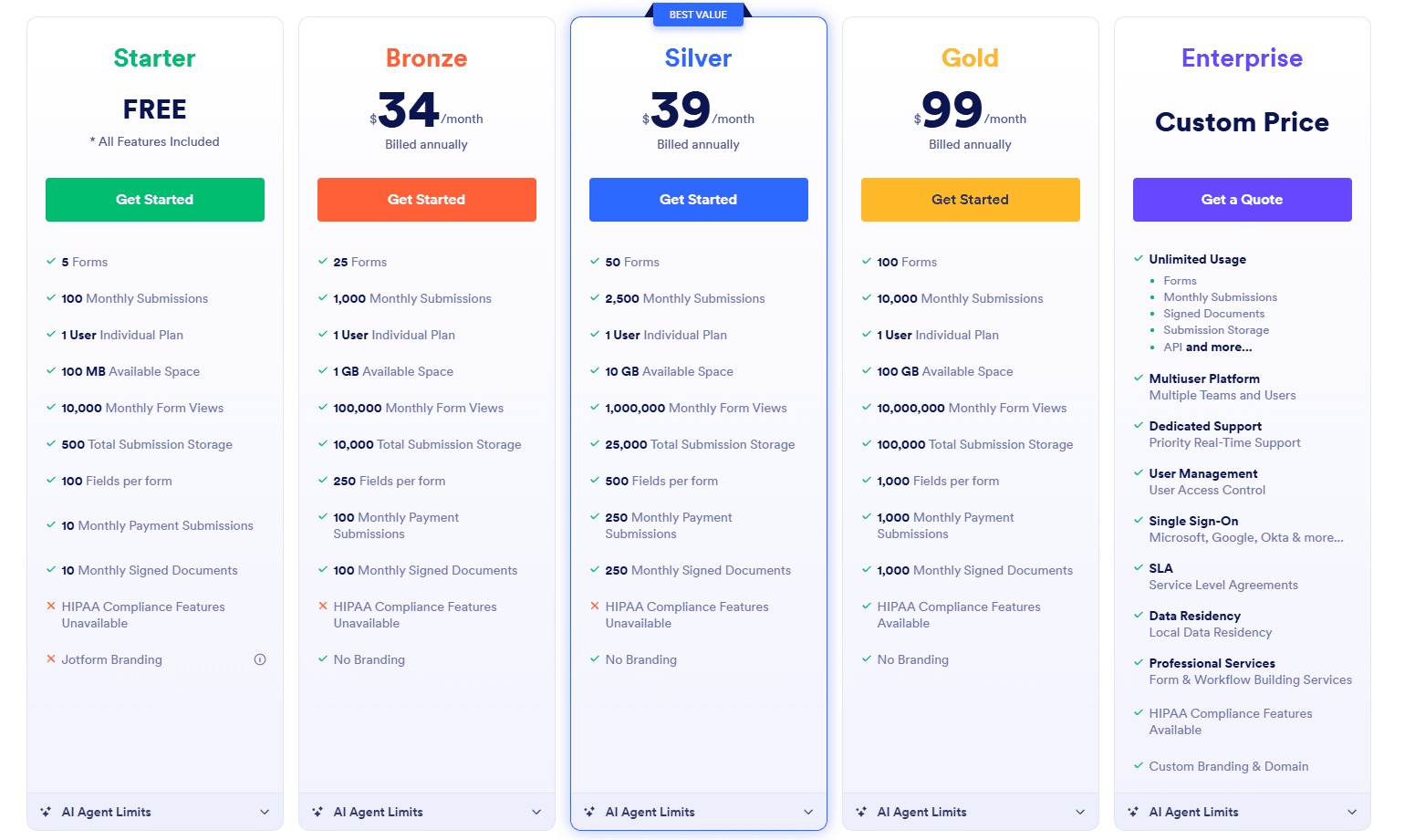
Jotform’s pricing is based on how much you use it, with different tiers depending on the number of forms, submissions, storage, and views.
The free Starter plan has limited features. Bronze ($34 per month) and Silver ($39 per month) give you more capacity, and Silver is a good value for growing teams.
The Gold plan ($99 per month) is designed for high-volume users. The Enterprise plan (custom pricing) includes unlimited usage, SSO, and compliance features. While mid-tier pricing is competitive, costs can go up quickly if your usage increases.
SurveyMonkey
SurveyMonkey is a well-known survey platform that has been around for a long time. It works for both quick polls and more detailed research projects. You can create customer surveys with different question types and get responses quickly.
SurveyMonkey uses AI tools to help you find patterns and themes in your data. It highlights the most important insights in your survey results.
Best for
SurveyMonkey works well for companies that need detailed market research or employee surveys. Its reports make it easy to spot trends in responses.
Feature list
- AI-powered analysis that finds insights in your data automatically.
- 200+ integrations with popular business tools.
- Global audience panel with 335 million people in over 130 countries.
- Multiple question types for online surveys and research.
- Skip logic and branching to show only relevant questions.
- Custom branding options for your surveys.
- Team collaboration tools.
- Mobile-friendly surveys for any device.
Pricing overview
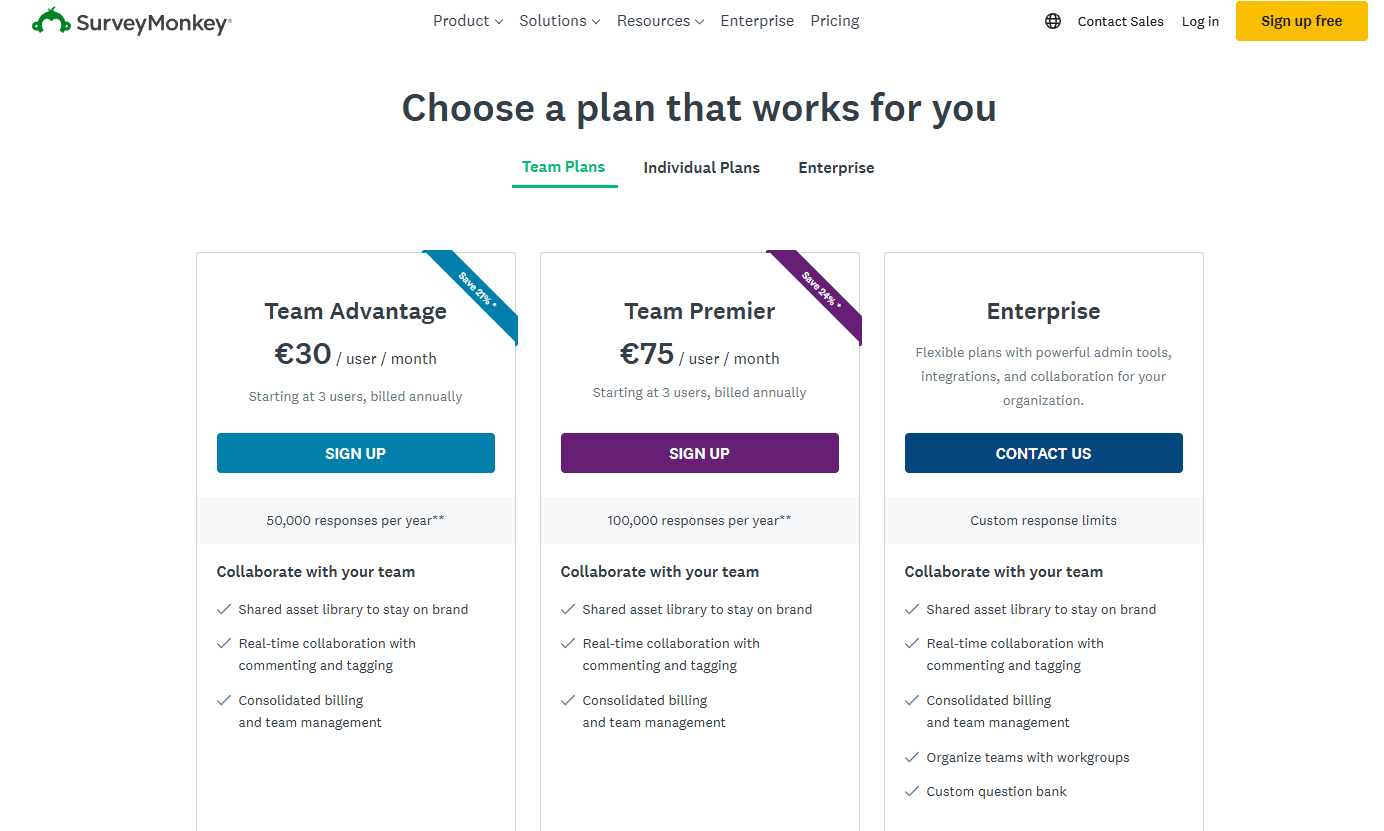
SurveyMonkey’s pricing is designed for teams and organizations, with a monthly fee per user.
The Team Advantage plan (€30 per user per month) includes core collaboration features and allows about 50,000 responses per year, making it a good choice for small to mid-size teams.
The Team Premier plan (€75 per user per month) offers higher response limits and adds advanced survey and admin features, making it suitable for teams that handle a lot of data.
The Enterprise plan (custom pricing) is designed for large organizations that need custom response limits, advanced admin controls, and more integrations.
Paperform
Paperform gives you a flexible form builder that feels like a document editor. You just type naturally, adding questions with simple slash commands. It handles everything from basic contact forms to customer feedback, payments and bookings.
The editor lets you add images, videos, and custom branding without coding. You can make your forms match your website, publish on custom domains, or embed them directly into your pages.
Best for
Paperform is great if you want forms that double as landing pages or mini-sites. It's a good fit for small businesses or agencies looking for professional-looking forms without hiring developers.
Feature list
- Unlimited forms on paid plans.
- Custom domains and branded URLs.
- Document-style editor with slash commands.
- Payment processing through multiple gateways.
- Electronic signatures by Papersign.
- Complex calculations and pricing logic.
- Conditional logic and question branching.
- Advanced analytics and AI-driven insights.
- Export data to spreadsheets and other tools.
- 700+ templates for various industries.
- Native integrations with CRMs and marketing tools.
Pricing overview
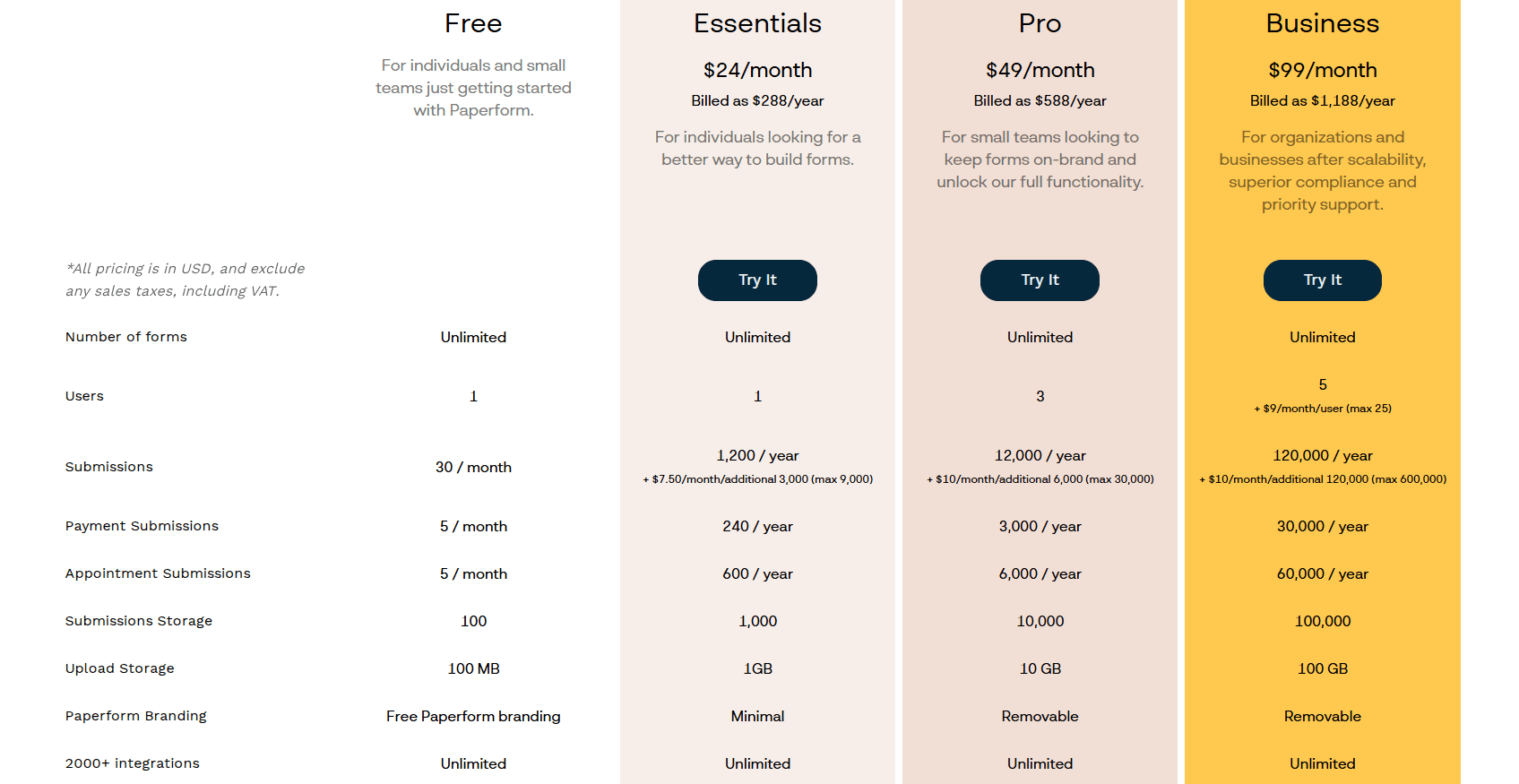
Paperform uses a simple tiered pricing model based on how many submissions you get, how much storage you need, and your team size.
The Free plan is quite limited with only 30 submissions per month, so it's best for testing. The Essentials plan at $24 per month gives individuals more submissions each year and extra storage, making it a good value.
The Pro plan, at $49 per month, is better for small teams. It allows more users, increases submission limits, and removes Paperform branding.
The Business plan, at $99 per month, is designed for organizations that need a high number of submissions, more users, and features that support compliance.
Why Porsline Is the Best Typeform Alternative
Porsline stands out as a form builder that removes common frustrations you might find in other form builders. You won't hit response limits on paid plans.
All your data appears in real time. You can export it as one complete Excel file instead of juggling multiple chunks.
The platform offers a user-friendly interface with a drag-and-drop editor that doesn't require any coding knowledge. You can switch between conversational and classic modes to control how your questions appear.
This flexibility helps you create conversational forms or other form types that match your needs, whether you're after basic data collection or highly customizable forms.
Advanced features set Porsline apart:
- Regex input validation lets you collect user responses in any format you define.
- Encrypted URL parameters protect data passed through survey links.
- Respondent authentication via SMS codes or email verification keeps things secure.
- Choice-level quotas help with scheduling and registration when you have limited spots.
- Location detection is great for field research and custom online forms.
- Question timers work well for timed quizzes and tests.
You can build sophisticated quizzes with the Calculations feature. This supports everything from simple tests to complex personality assessments with automated grading.
The answer key system includes automatic scoring and scheduled grade release. You can even track employee engagement or set up multiple-page forms for longer surveys.
Porsline captures partial submissions so you don't lose incomplete form responses. Built-in WhatsApp integration enables live chat with respondents during form completion.
You get SMS or Telegram notifications for new form submissions, so you don't have to check your dashboard constantly. The AI form generator helps non-technical users build forms quickly, even if they're new to online surveys.
The reporting tools include advanced filters to analyze specific data segments. You can customize chart colors and sorting options to make form analytics more meaningful.
Storage expansion has no limits, though extra space costs a bit more. Still, both the unlimited free and starter plans give you access to essential features for basic or in-depth exploration.
Conclusion About Typeform Alternatives
You’ve looked at some great alternatives to Typeform that can improve how you manage customer experiences. Each option has its own features to help you gather useful feedback from your audience.
Key factors to consider when choosing your form builder:
- Data security: Your information is kept safe on your own servers.
- Cost: You can save money with lower-priced plans.
- Features: Access advanced tools without running into extra charges.
- Integration: Easily connect with Google Analytics and other tools you already use.
A good form builder should help you increase conversion rates without needing extra tools for basic features. You want something that can grow with your business and keep your data secure.
Porsline is a top choice if you want an alternative to Typeform for building online forms. You can create attractive, conversational forms that keep costs down and engage your visitors. The platform is easy to use and offers features like conditional logic, payment processing, and detailed analytics.
You can make as many forms as you need and collect as many responses as you want, without worrying about limits. Your data stays safe, and you get all the advanced features needed to learn from your customers.
Want to build better forms?
Try Porsline for free and see how simple it is to create forms your audience will enjoy filling out.
FAQs About Typeform Alternatives
Is Jotform or Typeform better?
It depends on what you need. Jotform works better if you want more comprehensive features and tools for complex forms.
It has widgets for payments, signatures, and approvals that Typeform doesn't offer. Typeform is better if you care more about design and user experience.
Its one-question-at-a-time layout feels more engaging. But Jotform offers a "Card Form" option that mimics this style while still giving you almost all the advanced features.
Price matters too. Typeform's basic plan allows 100 submitted responses per month. Jotform's unlimited free plan gives you 100 responses, which is more helpful if you're just starting out or doing basic data collection.
Is Typeform better than SurveyMonkey?
They serve different needs. Typeform lets you create conversational forms that provide a much better experience for people filling them out.
The interface looks modern and feels friendly. It's a solid pick for professional-looking forms, short surveys, and lead forms.
SurveyMonkey stands out for analyzing data. You get advanced reporting tools, benchmarks, and form analytics that dig into your form submissions.
If you need deep insights from your form responses, SurveyMonkey offers comprehensive features. It feels like the right choice when you want almost all advanced features and professional research tools.
Pick Typeform if you care more about presentation and highly customizable forms. Choose SurveyMonkey for in-depth exploration and essential features focused on data analysis.