New Product Survey Template
Launching a new product? Use our professionally designed new product survey template to capture early impressions and drive smarter decisions.
Bringing a new product to market is exciting—but it’s also risky. What you think is brilliant may not align with what customers actually need or want. That’s why using a new product survey is essential. It helps you validate your idea, refine the offer, and launch with confidence.
A well-crafted survey allows you to collect actionable feedback on design, features, pricing, and user experience—before investing heavily in marketing or mass production. Whether you're part of a startup team, a product development squad, or a marketing department, this guide will walk you through how to use surveys to increase your chances of success.
What Is a New Product Survey in Marketing?
A new product survey is a targeted questionnaire designed to gather feedback from potential or early users about a product that is newly developed or about to be launched. It plays a critical role in modern marketing and product management, bridging the gap between internal assumptions and actual customer expectations.
These surveys help companies uncover whether their new product idea resonates with their intended audience, assess how customers perceive its value, and identify improvement areas before scaling. The questions typically focus on aspects such as design appeal, usability, perceived value, and purchase intent.
Why Is a New Product Survey Important in Business?
Launching a product without user feedback is like sailing blind. A new product survey empowers businesses to reduce risk, refine their product roadmap, and create offerings that genuinely meet market needs. It transforms assumptions into evidence and gives product teams the clarity they need to move forward confidently.
Here’s why it matters:
Validates Product-Market Fit
Before investing in mass production or wide-scale marketing, surveys help you determine if the product truly solves a problem or fulfills a need for your target audience.
Reveals Customer Priorities
You might be proud of a unique feature—but customers may care more about price, speed, or design. Surveys uncover what matters most to them.
Optimizes Marketing Positioning
Insights from survey data can inform messaging, branding, and feature prioritization. You’ll know which pain points to highlight in your campaigns.
Supports Agile Product Development
Early feedback lets teams iterate quickly. You can pivot, tweak, or enhance features before major investments are made.
Builds Trust and Loyalty
Asking for customer opinions makes users feel involved and valued. This engagement can drive long-term brand loyalty and advocacy.
Stat Insight: According to Nielsen, products that undergo customer validation through surveys and research are 60% more likely to succeed in the first year of launch.
Main Types of New Product Surveys
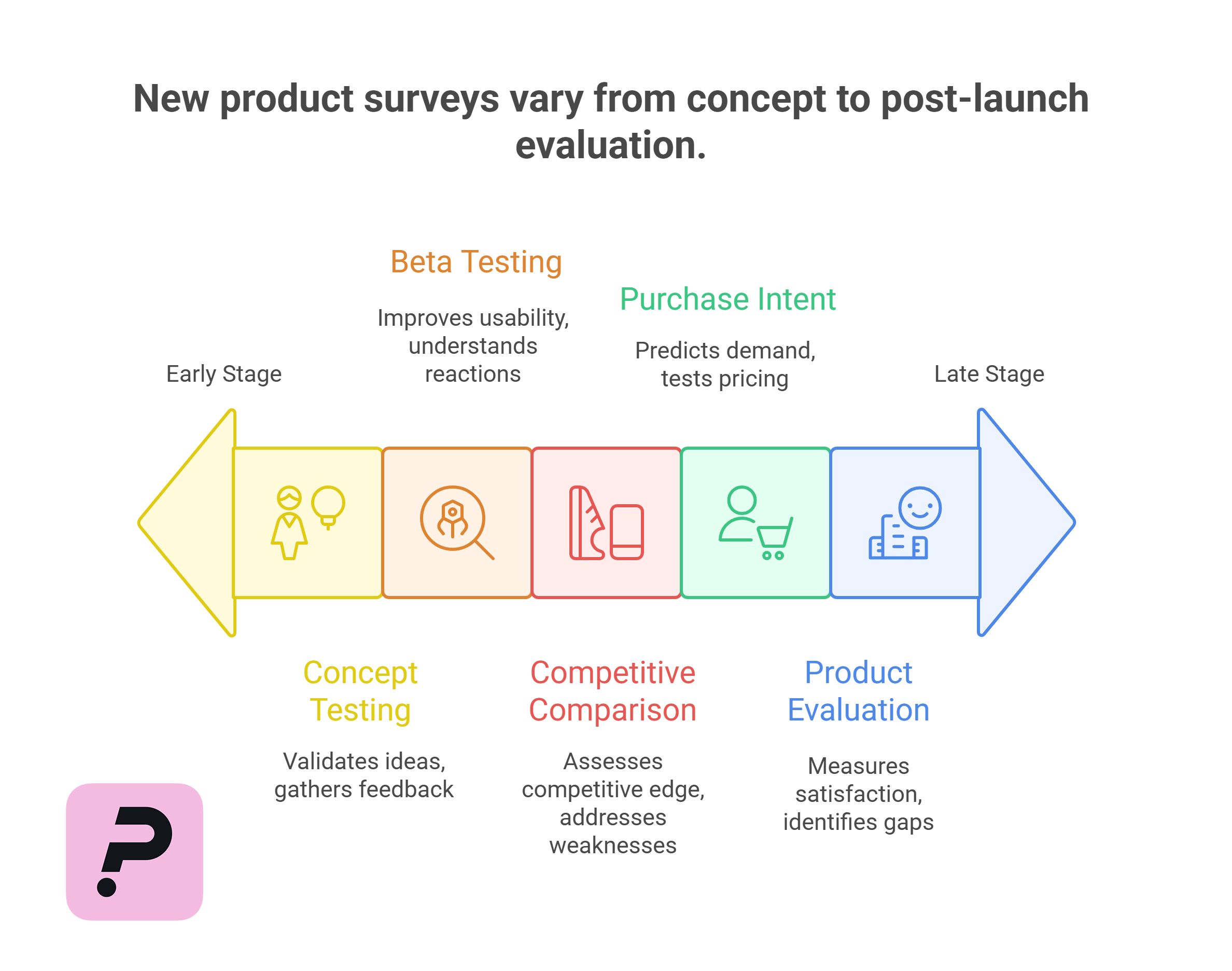
Not all new product surveys serve the same purpose. Depending on your launch stage and research goals, you can choose from different survey types to extract the most relevant insights. Below are the most common and effective ones:
1. Pre-Launch Concept Testing Survey
Used to evaluate product ideas or prototypes before any development is finalized.
Goal: Validate the concept and gather feedback on features, price expectations, and potential use cases.
2. Beta Testing Feedback Survey
Sent to users who are testing the beta version of your product.
Goal: Understand real-world performance, usability, and initial reactions to improve before public release.
3. Competitive Comparison Survey
Helps assess how your new product stacks up against alternatives already in the market.
Goal: Identify your competitive edge and address perceived weaknesses.
4. Purchase Intent Survey
Focuses on how likely a respondent is to buy the product.
Goal: Predict demand and test different pricing or positioning strategies.
5. Post-Launch Product Evaluation Survey
Sent after the official product release.
Goal: Measure customer satisfaction, identify gaps, and inform future updates or marketing campaigns.
Conclusion: Choosing the right type of new product survey ensures that you're asking the right questions at the right time—maximizing insight and minimizing waste.
Top Questions to Include in a New Product Survey
Crafting the right questions is essential to gather meaningful, actionable feedback. A high-quality product survey blends quantitative metrics (scales, ratings) with qualitative insights (open-ended questions) to help you understand both what customers think and why.
Below is a sample list of questions to include:
| Category | Sample Question | Question Type |
|---|---|---|
| First Impressions | How would you rate your initial impression of the product? | Likert Scale (1–5) + Comment |
| Needs Fit | Does this product solve a problem you currently have? | Likert Scale (1–5) |
| Design & Usability | How do you feel about the product’s design and ease of use? | Rating Scale + Optional Comment |
| Value Perception | Is the price reasonable for what the product offers? | Likert Scale (Strongly agree → disagree) |
| Purchase Intent | How likely are you to buy this product? | Yes / No / Maybe |
| Recommendation | Would you recommend this product to others? | NPS Scale (0–10) |
| Favorite Feature | What feature did you like the most? | Open-Ended |
| Improvement Suggestion | What can be improved in this product? | Open-Ended |
| Comparison | How does this product compare to others you’ve tried? | Rating Scale + Open-Ended |
| Additional Comments | Do you have any other thoughts or suggestions? | Open-Ended |
The right survey questions can make or break your product research. By combining structured scales with open-ended feedback, you gain both measurable insights and real customer voice—allowing you to optimize your product with confidence and clarity.
How to Create a New Product Survey Using Porsline – Step-by-Step
To ensure you collect reliable and actionable feedback, your new product survey must be thoughtfully structured and user-friendly. Below is a practical step-by-step guide to building a professional new product survey using Porsline—the leading smart survey platform in the MENA region.
Step 1: Log in and Choose a Blank or Ready-Made Template
Log in to Porsline and go to the dashboard.
You can either create a survey from scratch or use the pre-built New Product Survey Template available in the “Survey Templates” section.
Give your survey a clear, engaging title like:
“What Do You Think of Our New Product?”
You can fully customize the title and description to reflect your brand identity.
Step 2: Add Core Questions Using Logic
Start with essential evaluation questions using Likert scales about design, quality, and price.
Then, add open-ended questions for user suggestions and honest feedback.
With Logic, you can control what questions appear next based on previous answers (e.g., if a respondent chooses “Not satisfied,” show a follow-up question asking why).
This feature allows for a personalized flow for each participant.
Step 3: Customize the Design to Match Your Brand
Upload your company logo, select brand-aligned colors, and adjust fonts to match your product theme.
Porsline’s visual editor allows full control over layout, including font size, background color, and button style.
Step 4: Enable Notifications and Collect Data Effectively
Activate real-time alerts via email or SMS for every new response so your team stays informed.
Set a custom thank-you page at the end of the survey, and optionally add a link to your product page or social media accounts to drive follow-up engagement.
Step 5: Share the Survey Across Multiple Channels
From the “Share” tab, you can:
-
Copy a public URL
-
Create channel-specific links (WhatsApp, Instagram, Email, etc.)
-
Embed the survey in your website or display it as a pop-up
Porsline also supports QR codes
Step 6: Analyze Responses Intelligently
Go to the “Reports” section in your dashboard to:
-
View results as tables and visual charts
-
Apply filters by response, age group, or satisfaction level
-
Export data to Excel or Google Sheets for further analysis
With Porsline, you don't need technical skills to build a powerful, branded, and logic-based product survey.
All you need is a clear vision and smart questions—Porsline takes care of the rest, from form design to data visualization.
It’s a smart marketing tool that helps you understand your market—and launch with confidence.
Ready to discover how your customers truly feel about your new product?
Don't let your product's success depend on assumptions.
Start collecting real insights today with a professional New Product Survey using Porsline.
Whether you're launching your first product or upgrading an existing one, Porsline helps you make data-backed decisions that build trust and drive growth.
New Product Surveys (FAQ)
What is a new product survey used for?
A new product survey is designed to collect feedback from potential users about a product that’s being developed or recently launched. It helps validate the concept, evaluate design, and assess user expectations before scaling production or marketing.
What are the most important questions to include in a product survey?
Key questions should cover:
• First impressions
• Problem-solution fit
• Design and usability
• Price perception
• Purchase intent
• Suggestions for improvement
These can be a mix of scale-based and open-ended questions.
When should I send out a product survey?
Ideally, surveys should be shared at these stages:
• Before launch (concept testing)
• During beta testing (feedback loop)
• After launch (user satisfaction & improvement tracking)
How long should a new product survey be?
Keep it short and focused. A good product survey typically takes 5–7 minutes to complete and contains 8–12 well-crafted questions.
Can I customize my survey branding on Porsline?
Yes. Porsline allows full branding control. You can:
• Upload your logo
• Customize colors and fonts
• Add thank-you messages and redirect buttons
This helps you maintain consistency with your brand identity.
How can I analyze the results effectively?
Using Porsline’s dashboard, you can:
• Visualize responses through charts and graphs
• Apply smart filters
• Export data to Excel or Google Sheets
• Track metrics like Net Promoter Score (NPS), satisfaction rates, and trends over time
Is it possible to use the survey to generate leads?
Absolutely. You can include an optional email capture field at the end of your survey and invite respondents to join your newsletter or waitlist.


