Weekly Meal Order Form Templates
Still managing meal requests through paper sheets, scattered emails, or endless WhatsApp messages? It’s time to simplify the process. With ready-to-use Meal Order Form Templates, you can collect, manage, and track weekly lunch or catering orders in minutes. Whether you run a school, a workplace canteen, or a community event, these templates save time, reduce mistakes, and give you clear reports at the end of each week.
Try Porsline’s free meal order form templates today and start organising food orders the smart way.
Managing food orders may look simple at first, but for schools, workplaces, and event organisers it quickly turns into a time-consuming, error-prone task. Paper sheets get lost, email threads become messy, and WhatsApp messages never stop buzzing. The result? Confusion, duplicated orders, and unhappy participants.
That’s where Meal Order Form Templates make all the difference. Instead of chasing scattered requests, you can use a single online form that collects, organises, and reports every order in one place. Teachers can easily gather lunch preferences from parents, HR teams can manage weekly canteen requests from staff, and event coordinators can capture dietary choices from attendees before the big day.
In this article, we’ll explore what a meal order form template is, why it matters, the different types available for schools, companies, and events, and how you can design your own step by step. By the end, you’ll be ready to swap outdated methods for a faster, smarter, and more reliable way of managing meal orders.
What is a Meal Order Form Template?
A Meal Order Form Template is a ready-made digital form designed to collect and manage food orders in an organised way. Instead of relying on paper slips or messy spreadsheets, these templates allow schools, companies, and event organisers to gather requests through an online form that can be customised to fit any scenario.
Typically, a food order form template includes:
-
Basic information fields such as name, ID, class, or department.
-
Day selection to let users choose which days they want to order meals.
-
Daily menu options, either in text or with images, so participants can pick their preferred dish.
-
Special requests or dietary restrictions, such as vegetarian, gluten-free, or low-calorie meals.
-
Optional add-ons, like drinks or desserts, to increase flexibility.
All responses are stored in one central dashboard, making it easy to generate weekly reports, track demand for specific meals, and avoid overbooking.
📌 In short: Meal order form templates turn a manual, error-prone process into a streamlined digital workflow that saves time for organisers and gives participants a smoother experience.
Start using Porsline’s Meal Order Form Templates today — free, customisable, and built to save you time every week.
Why are Meal Order Form Templates Important?
At first glance, collecting meal requests might look simple. But for schools, offices, and event organisers, the process often turns into a weekly headache. Paper slips get misplaced, spreadsheets become overwhelming, and constant back-and-forth messages waste valuable time.
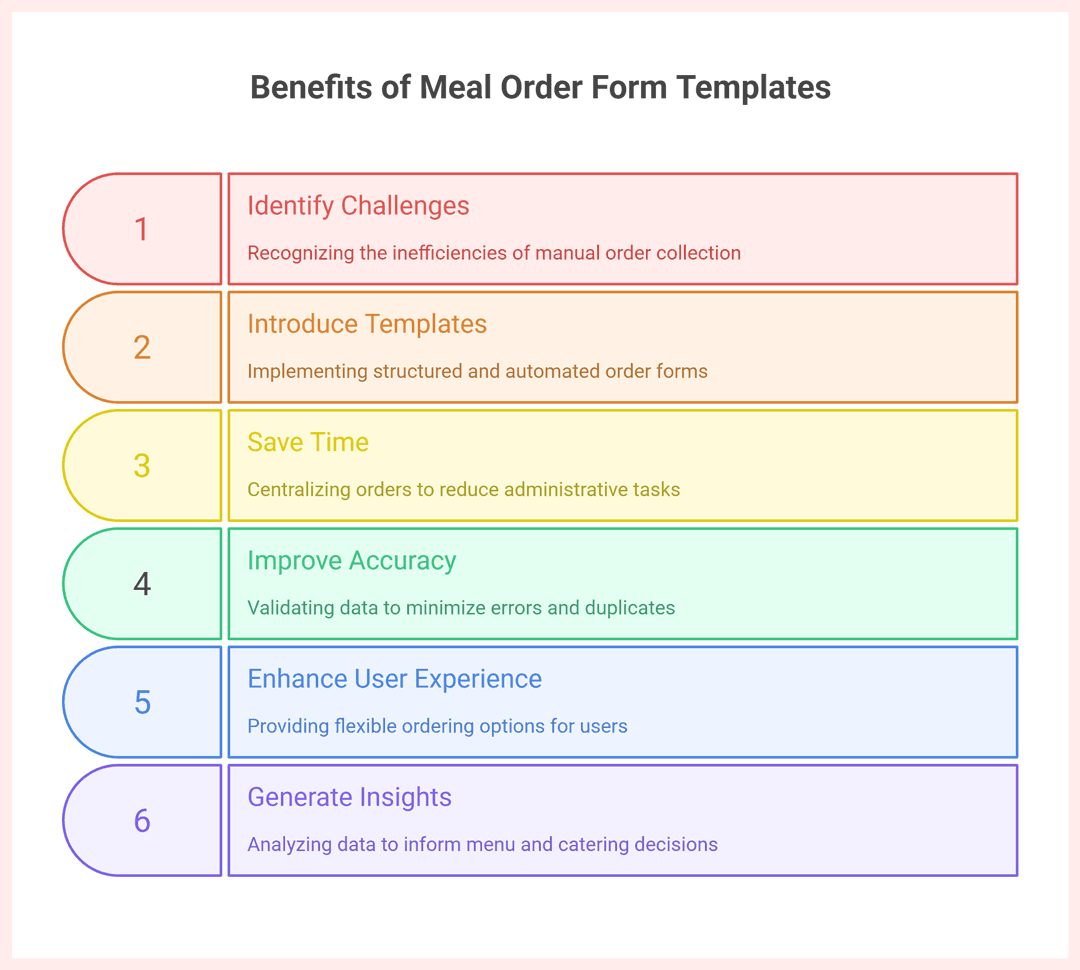
Using Meal Order Form Templates solves these challenges by introducing structure and automation:
1. Save Time and Reduce Admin Work
All orders are submitted directly into a central system. No more chasing parents, staff, or attendees individually—everything is captured instantly and stored in one place.
2. Improve Accuracy and Avoid Mistakes
With digital validation rules, each participant must complete the required fields correctly. This reduces duplicate orders, missing details, or miscounted meals.
3. Better User Experience
Parents, employees, or participants can place their orders anytime from their phone or computer, and even update them before the deadline. This flexibility increases satisfaction and trust.
4. Data-Driven Insights
Weekly reports show which meals are most popular, which days have higher demand, and what dietary needs must be considered. This helps schools and companies adjust menus and negotiate better deals with caterers.
Example:
A primary school in London replaced its paper lunch slips with an online meal order form template. Within two months, they reduced admin time by 50% and eliminated double bookings, while parents reported a smoother ordering experience.
In today’s fast-paced environment, schools, businesses, and event organisers can’t afford the inefficiencies of paper slips or scattered messages. Meal Order Form Templates offer a smarter, structured, and reliable alternative—one that saves time, improves accuracy, and creates a better experience for everyone involved. By adopting digital forms, you’re not just simplifying the process of collecting orders, you’re laying the foundation for more organised operations and data-driven decision making.
Types of Meal Order Form Templates
Different organisations have different needs when it comes to managing food orders. A school’s lunch system looks very different from a corporate staff canteen or a weekend community event. That’s why Meal Order Form Templates can be adapted to suit a wide range of use cases. Here are the most common types:
1. School Lunch Order Forms
Designed for parents or students to pre-order meals for the week.
-
Features: daily menu options, dietary notes (allergies, vegetarian, halal), and optional add-ons.
-
Benefit: reduces admin load for teachers and ensures students receive the right meal.
📌 Example: A public school in Toronto uses a weekly lunch order form to collect choices from parents every Friday, with automated reports sent to the catering provider.
2. Employee Meal Order Forms
Used in workplaces where companies provide or subsidise meals.
-
Features: employee ID, day selection, meal preferences, and limits per dish.
-
Benefit: helps HR or facility managers streamline canteen operations.
📌 Example: A manufacturing plant in Birmingham uses a staff meal order template to manage 400 daily lunch orders, preventing over-preparation and food waste.
3. Event or Conference Catering Forms
Perfect for organisers who need to manage large groups with diverse dietary needs.
-
Features: attendee registration, meal type (regular, vegetarian, gluten-free), and timing preferences.
-
Benefit: ensures smoother catering logistics and better attendee satisfaction.
📌 Example: A Sydney tech conference used a meal order form to plan meals for 1,200 participants, ensuring all dietary restrictions were met.
4. Visual Menu Order Forms
Forms enhanced with images of meals to make the selection process easier and more engaging.
-
Features: photos of each dish, clear portion sizes, optional upselling for drinks/desserts.
-
Benefit: improves the user experience, especially in schools and community programs.
📌 Example: A private school in Melbourne increased parent engagement by 30% after switching from text-only menus to a visual meal order form.
Whether you’re running a school cafeteria, a staff canteen, or a large-scale event, there’s a meal order form template that fits your needs. By tailoring the template to your context—adding menus, dietary preferences, and capacity limits—you can make food ordering simpler, faster, and more reliable.
Suggested Questions in a Meal Order Form
Designing the right set of questions is the backbone of any effective meal order form. Questions should be simple, clear, and collect just the right amount of information to make order management smooth and error-free.
Here’s a structured table of the most common and useful questions to include in Meal Order Form Templates:
| Question | Type of Question | Purpose |
|---|---|---|
| Full Name / Student or Employee ID | Short text | Identify the respondent and avoid duplicate orders |
| Which days of the week do you need meals? | Multiple choice | Capture the days when meals are required |
| Saturday Menu Selection | Multiple choice (single) or visual | Record the chosen meal for that day |
| Sunday Menu Selection | Multiple choice (single) or visual | Same as above (repeated for each day) |
| Additional items (drinks/desserts) | Multiple choice (optional) | Upsell or allow extra options |
| Special dietary needs (vegetarian, gluten-free, halal, etc.) | Multiple choice | Respect health, religious, or lifestyle requirements |
| Contact info (email/phone) | Short text | Send confirmations or reminders |
| Feedback or suggestions | Long text | Collect insights to improve future menus |
Design Tips
-
Keep it logical: Start with identity → days → menu → extras → notes.
-
Use visuals where possible: Photos of meals make selection easier.
-
Don’t overload users: Limit the number of mandatory questions to improve completion rates.
In short: The right questions make your food order form easy to fill, ensure accurate data for organisers, and improve overall user satisfaction.
Ditch paper slips. With Porsline’s Meal Order Form Templates, collect and track weekly lunch orders online in minutes.
How To Build a Meal Order Form in Porsline (Step-by-Step Guide)
Building a professional meal order form template may sound complex, but with the right platform it’s straightforward. Porsline provides an intuitive drag-and-drop builder that allows schools, companies, and event organisers in the UK, Canada, and Australia to design, customise, and launch their forms without technical skills. In the following steps, we’ll walk you through the entire process — from setting up your welcome page to extracting weekly reports — ensuring your form is not only functional but also branded and user-friendly.
Step 1 — Create the form & write a clear Start page (Welcome)
Objective: Set expectations and house rules before users begin.
Actions
-
Sign in → Create new survey/form → name it clearly, e.g. “Week 12 Meal Orders (Staff Canteen)”.
-
Add a Start (Welcome) page with: the ordering window (dates/times), who can order, edit/cancel rules, and contact info.
Sample Start page copy

Welcome to weekly meal ordering
Orders are open Thursday 09:00 – Friday 22:00 for next week.
You may select up to 5 days and one meal per day. Quantities are limited; items will close when full.
You can edit your order until the deadline. For help, contact [email protected].
Pro tips
-
Use your local timezone and date format (e.g., DD/MM/YYYY in the UK).
QA
-
Preview on mobile; ensure no line wraps break key messages.
Step 2 — Add identity & contact fields with validation
Objective: Prevent duplicates and tie every order to a person.
Actions
-
Add Short text: Full Name (letters only).
-
Add Short text: Employee/Student ID (digits; set length, e.g., 6–8).
-
Add Email or Phone (optional but recommended for confirmations).
-
Mark critical fields as Required.
Pro tips
-
If your organisation uses a roster, consider Authentication (whitelist emails/IDs) instead of asking for name again (see Step 7).
Step 3 — Let users choose the days (Multiple Choice)
Objective: Capture the days they need meals; this drives logic.
Actions
-
Add Multiple choice : “Which days do you need meals?”
Options: Monday, Tuesday, Wednesday, Thursday, Friday (add Saturday/Sunday if applicable). -
Set Required; optionally set min = 1, max = 5.
Pro tips
-
Keep order Monday→Friday to match school/work patterns.
Step 4 — Build a daily menu for each selected day
Objective: One single-choice menu per day keeps data clean.
Actions
-
For each day, add a Single choice question (one meal per day).
-
Optional: use image choices to show dish photos.
Pro tips
-
Duplicate the first day’s question to speed up setup; then edit options.
Step 5 — Apply Skip Logic so users only see relevant days
Objective: Shorter, smarter journeys.
Actions
-
On the Days question, add a rule for each day:
If Monday is selected → go to Monday Menu page, then continue to the next selected day, and so on. -
After the last selected day, route to Thank-you (or next section).
Pro tips
-
Keep the logic order aligned with day order to avoid loops.
Step 6 — Set capacity limits per dish (prevent over-ordering)
Objective: Stop orders when stock is gone.
Actions
-
In advanced setting, enable Limit the number of responses.
-
Set capacities (e.g., Chicken tikka = 40, Veg lasagne = 30)..
Step 7 — Control access (Authentication & one-time submissions)
Objective: Only authorised users can order; one order per person.
Actions
-
Go to Settings → Advanced → Respondent authentication.
-
Choose a method:
-
Whitelist of organisational emails/IDs/phone numbers.
-
One-time codes if needed.
-
-
Optionally enforce one submission per user.
Step 8 — Brand the form (logo, colours, background)
Objective: Trust and clarity.
Actions
-
Design tab: add logo, set brand colours, pick a clean background.
-
Ensure high contrast and readable fonts; avoid busy imagery.
Step 9 — Define the ordering window (auto open/close)
Objective: Keep operations on schedule.
Actions
-
Settings → General: set Start and End dates/times.
Step 10 — Allow edits until the deadline (optional but recommended)
Objective: Fewer support emails; happier users.
Actions
-
Settings → Advanced: enable Allow respondents to edit the responses.
Step 11 — Send confirmations & internal alerts (Email/SMS)
Objective: Transparency for users; visibility for catering.
Actions
-
Settings → Notifications: turn on Email (and SMS if available).
-
Use Piping (@) to include answers in the message:
-
“Thanks, [Full Name]. Your order for [Monday: Selected Meal], [Tuesday: Selected Meal] has been received.”
-
-
Add an internal notification to catering/operations (summary per submission).
Step 12 — Customise the form link (slug & subdomain)
Objective: Professional, shareable URLs.
Actions
-
Set a clean slug, e.g.,
/staff-meals-week-12. -
If your plan supports it, point a custom subdomain (e.g., meals.yourorg.co.uk).
Step 13 — Publish & share (email, LMS/intranet, Teams/Slack)
Objective: Reach your audience where they already are.
Actions
-
Activate the form; copy the link.
-
Share via email, intranet/LMS (e.g., Google Classroom, Moodle), Teams/Slack channels, or print a QR code on noticeboards.
Step 14 — Weekly reporting (Results table, filters, Excel export)
Objective: Accurate prep & procurement.
Actions
-
Results → Table: set date filter to the specific week.
-
Use Advanced filters (e.g., “Tuesday = Veg lasagne”) to tally counts by dish/day.
-
Export to Excel for the caterer.
-
Analytics/Charts: review popular meals and daily volumes.
Step 15 — Write a clear Thank-you page (and next steps)
Objective: Close the loop and set expectations.
Sample Thank-you page copy
Thanks — your order has been received.
A confirmation has been sent to [email/phone].
You may edit your order until Friday 22:00 using the link in your confirmation.
If you have allergies or need assistance, contact [email protected].
By following these 15 steps, you will have transformed a manual, error-prone ordering system into a streamlined digital process. From capacity limits and authentication to branded design and automated notifications, every detail ensures accuracy and saves valuable time. With Porsline, you don’t just build a form — you create a data-driven system that supports decision-making, improves user satisfaction, and keeps operations running smoothly week after week.
👉 Ready to get started? Create your free Porsline account and launch your first meal order form template today.
FAQ about Meal Order Form Templates
How do I create a weekly meal order form?
You can build one using an online form builder like Porsline. Simply add basic fields (name, ID), days of the week, daily menu choices, and special dietary options. Then publish the form and share the link with students, staff, or attendees.
Can I limit the number of meals available for each dish?
Yes. Meal order form templates allow you to set capacity limits for each menu item. Once the maximum number is reached, the option is automatically closed or disabled.
Is there a free template for school lunch orders?
Absolutely. Porsline offers free meal order form templates that schools can customise with weekly menus, dietary requirements, and optional add-ons.
Can employees pre-order meals for the whole week?
Yes. Companies often use meal order form templates to let staff pre-select their lunches for the week. HR or facility managers can then export a summary to coordinate with catering teams.
How do I manage special diets (vegetarian, halal, gluten-free)?
Add a multiple-choice field for dietary preferences in the template. This ensures that specific dietary needs are captured and reflected in the catering plan.
Can users edit their order after submission?
Yes. With Porsline, you can enable the “Edit responses” option, allowing users to adjust their orders until the deadline you set.
How can I export weekly meal orders to Excel?
In Porsline, all responses are stored in a central dashboard. You can filter by date (weekly) and export the results as an Excel file to share with your catering provider or admin team.
Are meal order forms mobile-friendly?
Yes. All Porsline meal order form templates are responsive, meaning they work smoothly on desktops, tablets, and smartphones without extra setup.


