A call center survey template turns every post-call interaction into structured, comparable data. Use it to capture CSAT, spot coaching needs, and close the loop faster. Built for managers, QA leads, and support ops.
Launch a call center survey template when you need consistent, post-call feedback without extra manual work. Keep it short (≈6–8 items), mix rating scales with one open text, and align questions to metrics you actually act on—speed of answer, professionalism, problem resolution, and knowledge depth. In Porsline, you can brand it, add logic, and publish in minutes.
Track outcomes that matter: CSAT, resolution at first contact, time to answer, clarity and empathy.
Compare agents and queues fairly with standardized scales and identical wording.
Trigger alerts for low scores to prioritize callbacks and coaching.
Export clean datasets to your BI stack for weekly trend reviews.
Start simple: a focused call center survey template outperforms long questionnaires and yields higher completion. Standardize wording now; your time-series trends will thank you later.
What Is a Call Center Survey Template in Customer Service?
Leaders need a repeatable way to capture post-call reactions without reinventing questions each week. A call center survey template standardizes wording, scales, and routing so feedback stays comparable.
A call center survey template is a ready-made, standardized questionnaire for collecting post-call customer feedback across agents, queues, and time periods.
When to use it:
After support calls to measure CSAT, resolution, and professionalism consistently.
During QA cycles to surface coaching needs and training gaps.
Before vendor audits to document service quality with defensible metrics.
When launching new products or scripts to gauge clarity and impact.
In quarterly reviews to compare teams fairly using identical scales.
Think of it as a measurement fixture: same questions, same scales, clean trends. It’s not a catch-all survey—keep scope tight to post-call experience only.
Start Your Free Survey Trial on Porsline
Why the Call Center Survey Template Matters for Call Center Managers & CX Leaders
The right template compresses feedback into signals you can coach on. It also keeps data consistent across agents, shifts, and vendors—so your trends aren’t guesswork.
Higher response rates, faster reads. Keep the call center survey template to ~6–8 items to sustain 35–60% completion (estimate based on SERP/PAA scan of best-practice guides).
Cleaner agent comparisons. Standardized scales (e.g., 1–5 for knowledge, professionalism, resolution) reduce rater drift, enabling fair QA scoring and targeted coaching.
Quicker loop closure. Auto-alerts on low CSAT or “issue not resolved” cut escalation lag from days to hours (ops benchmark estimate from customer support playbooks).
Proof for leadership and audits. Time-series CSAT, FCR (first contact resolution), and “answer speed” trends withstand scrutiny during quarterly reviews and vendor checks.
Training ROI you can see. Tag low-scoring themes (e.g., billing, onboarding). Re-measure 2–4 weeks post-training to verify lift rather than relying on anecdote.
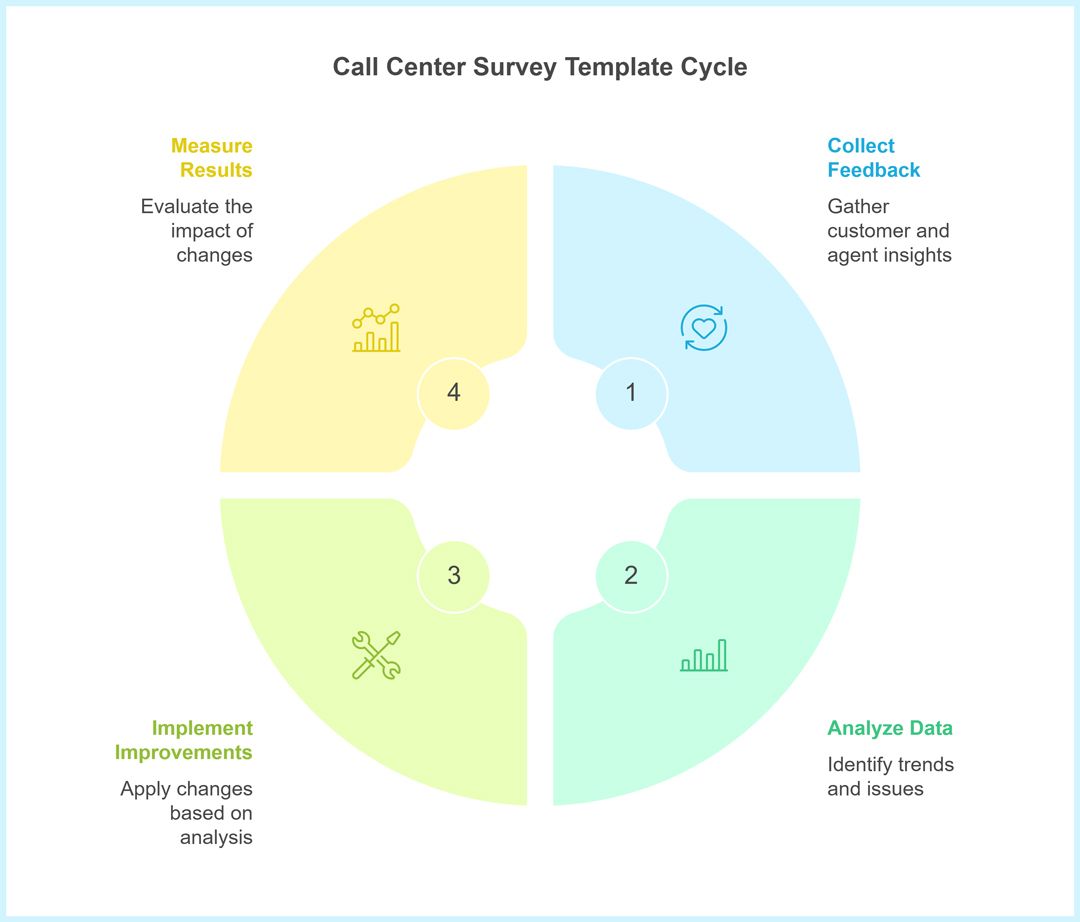
The call center survey template turns post-call moments into structured signals you can coach and automate. Start with quick wins: timing, 3–5 behavior tags, and alert thresholds.
Call Center Survey Template Variants and Examples
Different goals, channels, and cadences call for different builds. Choosing the right call center survey template variant keeps questions tight and insights actionable. Pick by metric, not fashion.
Post-Call CSAT (baseline). Choose when you need a week-over-week satisfaction trend tied to specific queues and agents.
Agent Conduct & Knowledge add-on. Use when coaching is the priority; add 2–3 items on professionalism, clarity, and product knowledge.
NPS after Support. Run when leadership wants relationship health right after resolution; schedule weekly to avoid over-surveying frequent callers.
Customer Effort Score (CES). Select when friction is suspected; one item reveals how hard it was to get help (great for billing or tech issues).
IVR keypad micro-survey. Deploy when phone completion must be immediate; 3–4 digits for CSAT/resolve keep drop-off minimal.
SMS/email web-link micro-survey. Use when you want richer text feedback and branding; ideal if you already capture mobile/email in CRM.
Start with Post-Call CSAT as your baseline; layer CES or conduct items only if they drive coaching decisions. Match channel to context: IVR for immediacy, SMS/email for detail.
Call Center Survey Template Questions (Table)
Questions should map directly to coaching and QA decisions. Keep scales consistent across agents and weeks, then add one open text for nuance you can act on.
| Question | Type | Purpose |
|---|---|---|
| Considering your latest call, how satisfied are you with the overall experience? | Scale (1–5) | Overall CSAT benchmark for weekly trend tracking. |
| Call center specialist was knowledgeable enough to solve my problem. | Likert (1–5) | Assess product/process expertise by queue/agent. |
| Call center specialist understood my problem thoroughly. | Likert (1–5) | Validate diagnosis accuracy and listening skills. |
| Call center specialist’s conduct was polite and professional. | Likert (1–5) | Measure soft skills: tone, respect, empathy. |
| My call was answered within a short amount of time. | Scale (1–5) | Capture perceived responsiveness/speed to answer. |
| My problem was solved by the end of the conversation. | Yes/No | Track resolution and first contact resolution (FCR). |
| We’re happy to hear your ideas and recommendations for better service. | Open text | Collect actionable suggestions and context for low scores. |
This mix covers satisfaction, expertise, conduct, speed, and resolution—plus context. Standardize wording now to protect comparability across agents and time.
How to Create a Call Center Survey Template in Porsline (Step-by-Step)
You can build, launch, and analyze a call center survey template without code. The workflow below prioritizes clarity, governance, and fast reporting—so feedback turns into coaching.
0) Before you start — pick your path
Sign up/log in. Choose:
a) Template path: Open Survey Templates Library, select Call Center Survey, click Use this template, then tailor.
b) From scratch: Create a blank survey and add the core question set.
1) Name
Rename by unit/region and cycle (e.g., “Call Center CSAT — Inbound — Q4”)..
Use: Survey title/description, foldering.
2) Branding & access controls
Apply logo/colors and set who can respond and how. Decide anonymous vs. identified.
Use: Logo, color theme, background, custom buttons/thank-you page, Multilingual, Anonymous mode, domain restriction, one-response-per-user, OTP code, open link vs. invite-only, start/close scheduling, progress bar.
3) Question design (lean & comparable)
Welcome page:
Title: Tell us about your recent support experience
Subtitle: This quick survey (1–3 minutes) helps us improve. Your answers are confidential and used for coaching and service fixes.
Button: Start survey
Target 6–10 items plus one open text; fix scales to 1–5. Add 2–3 role-specific items if they drive action.
Use: Likert/Matrix, multiple choice (single/multi), dropdown, ranking, rating, NPS/eNPS, short/long text, numeric, date/time.
Use (quality): Required fields, min/max, input masks, defaults/placeholders, section/page breaks.
End — Standard:
Title: Thanks for your feedback
Body: Your answers help us coach our team and improve policies. We review trends weekly and act on the top issues first.
4) Logic & flow (only what’s relevant)
Show follow-ups only when needed; keep branches short.
Use: Conditional Logic (question/page), Skip Logic/Smart Routing, show/hide rules, randomization (choices/blocks), page order, Piping (answers/metadata).
5) Endings / Thank-You Pages (with logic)
We’ll show a different ending based on Q6: “My problem was solved by the end of the conversation.”
A) If Resolved = Yes (default thank-you)
Title: Thanks—glad we could help
Body (1–2 lines): We appreciate your time. Your feedback feeds this week’s coaching and service updates.
Button (optional): Back to our Help Center
B) If Resolved = No (conditional thank-you)
Title: Thanks—we’re on it
Body (2 lines): We’re sorry this wasn’t resolved. Our team will review your response. If you added details, we’ll prioritize a follow-up.
Primary button: Request a callback (opens follow-up form)
Secondary text: You can also reach us via email or WhatsApp listed on our support page.
6) Distribution (get it in front of people)
Match channels to your audience and tech stack.
Use:
Link: Copy share link (append UTMs if you track campaigns).
QR code: Generate and place on kiosks or agent desktops if needed.
Email/SMS: Send within 5 minutes of interaction (best for response rate).
Embed (optional): Add to help center/portal as a widget.
7) Notifications & automation (signal, not noise)
Trigger only on meaningful thresholds.
Use: Per-response Email Notifications, rules for CSAT ≤ 2/5 or “Not resolved, webhooks/API, Slack/Email via connectors.
8) Pilot, fix, and launch
Soft-launch to one queue for 24–48 hours; review completion time, drop-offs, and comments; adjust wording/logic.
Use: Survey duplication for A/B copies, access scheduling, progress tracking, close date visibility, staged rollouts.
9) Analyze & share results
Compare drivers and outcomes by team, channel, and period.
Use: Live dashboards, filters (team/tenure/location), cross-tabs, time comparisons, open-text theming/tagging (if enabled), shareable reports, CSV/Excel export.
10) Close the loop & schedule a pulse
Publish actions, and time-box follow-ups.
Use: Results summary, downloadable charts, report sharing, survey duplication to set a 6–8 week pulse, calendar reminders/automations.
Pro tips (quick wins)
Keep completion time ≤ 3 minutes; drop anything that doesn’t inform coaching or a process change.
Launch Your Call Center Survey Template in Minutes
Ready to turn post-call opinions into coaching-ready signals? This call center survey template gives managers and CX leaders fast setup, clean metrics, and repeatable workflows.
Start Your Free Survey Trial on Porsline
Call Center Survey Template FAQ
What should I ask in a call center survey?
Cover one outcome (CSAT), resolution, effort, and 2–3 coachable behaviors (clarity, accuracy, courtesy). Add one open text for context. Keep scales consistent.
How long should a post-call survey be?
Aim for 1–3 minutes. Use 6–10 items total. Short surveys reduce drop-off and improve completeness without sacrificing trend reliability.
When should I send call center survey?
Dispatch within 5 minutes of the interaction to capture fresh memory and lift participation. For complex tickets, follow up after resolution confirmation.
IVR, SMS, email, or in-app—what’s best?
Match the channel to the contact: IVR for voice immediacy, SMS for fast mobile reach, email for richer context, in-app/chat for frictionless taps.
What is a “good” CSAT in call centers?
Benchmarks vary; many teams track 75–85% satisfied (est.). Prioritize trend and driver movement by queue/region over chasing a universal target.
Should I include NPS in call center survey?
Optional. Use 0–10 once per cycle if leadership needs it. Don’t replace CSAT/effort; NPS gauges advocacy, not interaction quality.
How do we reduce bias or gaming in call center survey?
Avoid leading language, randomize item order, include attention checks, and separate coaching from compensation. Calibrate QA with periodic shadow scores.