Volunteer Sign-Up Form Template
A volunteer sign-up form shouldn’t slow you down—it should fill shifts fast.
Use this template to capture availability, skills, and consent in minutes so your event runs smoothly and no one gets missed.
Equip nonprofit and event teams with a practical, ready-to-use volunteer sign-up form that makes recruitment faster, scheduling clearer, and communication smoother. This guide explains what to include, why it matters, and how to collect availability, skills, and shift preferences in one place—using Porsline’s flexible form builder.
By the end, you will:
Know the essential fields and best practices for a high-converting volunteer sign-up form.
Map volunteer availability to roles and shifts without spreadsheets.
Automate confirmations, reminders, and basic assignments to cut manual work.
Launch a polished form in minutes and keep all data organized for reporting and follow-up.
What Is a Volunteer Sign-Up & Availability Form?
A volunteer sign-up form is a simple online intake that collects the essentials—contact info, skills, interests, and availability—so you can match people to the right roles and shifts fast. For nonprofits and events, it’s the front door to your volunteer program and the system of record for staffing.
Core components to include
Contact details: name, email, phone (with opt-in for SMS reminders).
Interests & skills: areas they want to help (e.g., registration, logistics, fundraising) and any relevant skills or certifications.
Availability: preferred days/times, date ranges, and willingness for early/late shifts.
Role/shift preferences: rank top choices; indicate physical requirements they’re comfortable with (standing, lifting, outdoors).
Experience level: first-time vs. returning volunteer; past roles or hours.
Logistics: T-shirt size, language(s) spoken, transportation/access needs.
Compliance & consent: media release, background-check consent if applicable, and data-use consent.
Emergency contact: name, relationship, phone.
Why it matters
Keeps all data in one place (no scattered spreadsheets).
Speeds up scheduling and confirmation with fewer back-and-forth messages.
Improves volunteer experience by aligning people to roles they actually want—and can attend.
In one line: a modern volunteer sign-up form turns interest into organized rosters and filled shifts—without admin chaos.
Start your free Porsline account and launch your first form in minutes
Start Your Free Survey Trial on Porsline
Why Volunteer Sign-Up & Availability Form Matters (Real-World Benefits)
A solid volunteer sign-up & availability form is more than data capture—it’s how you turn goodwill into reliable shifts and happier teams.
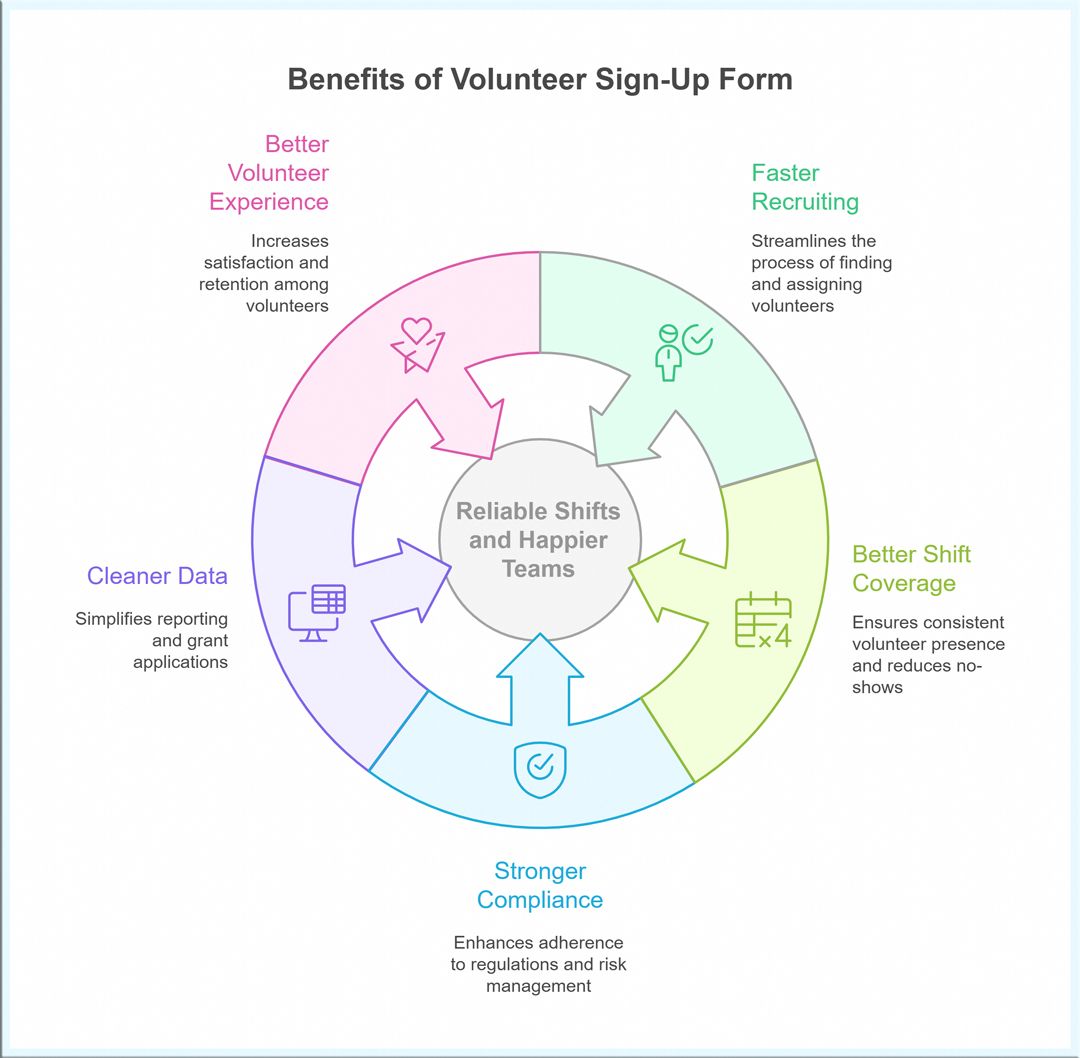
1) Faster recruiting, less back-and-forth
Collect contact details, skills, and time windows once, then map people to roles without email chains or spreadsheets. Clear intake is a core best practice in volunteer management.
2) Better shift coverage and fewer no-shows
When volunteers can state preferred days, hours, and tasks up front, scheduling fits real life—so confirmations stick and retention improves. Practical guidance from nonprofit councils stresses clarity and role fit.
3) Stronger compliance and risk management
Add optional checks (e.g., consent, waivers, emergency contact, role-based screening) and centralize acknowledgements. Nonprofit risk centers recommend role-specific screening and consistent, documented processes.
4) Cleaner data for grants and reporting
Standard fields (skills, hours, events served) make it easier to prove impact to funders and plan capacity for the season ahead. Sector sources highlight using current data to shape volunteer strategy.
5) Better volunteer experience
Let people choose how they want to help (skills-based, front-of-house, logistics) and how often. Recognition and smart placement are hallmarks of high-performing programs.
In short: a well-designed form aligns volunteer motivation with your real staffing needs—so events run on time and teams don’t burn out.
Types of Volunteer Sign-Up & Availability Forms
Not every program has the same intake needs. Pick a form type that matches your context so you only ask for what you’ll actually use.
1) One-time Event (festivals, conferences, races)
Capture: date(s), shift blocks, role preferences, T-shirt size, on-site briefing time.
Tip: require “can arrive 30–45 min early” and transportation method to reduce late starts.
2) Seasonal / Campaign-Based (holiday drives, summer programs)
Capture: availability windows across weeks, recurring day(s), minimum hours per week.
Tip: add a “blackout dates” field to avoid rescheduling ping-pong.
3) Ongoing Weekly Roles (front desk, tutoring, pantry)
Capture: preferred weekday/time slot, commitment length, supervisor availability.
Tip: show 2–3 pre-approved shift options to speed assignment.
4) Skills-Based / Professional Volunteers (design, legal, IT, comms)
Capture: portfolio/LinkedIn, certifications, deliverable preferences (e.g., one-off advice vs. multi-week project).
Tip: include “estimated hours per month” and “conflict-of-interest” checkbox.
5) Youth / Minors (schools, clubs)
Capture: parent/guardian consent, emergency contact, transportation permissions.
Tip: use conditional logic to show consent language only for <18.
6) Remote / Virtual (hotline, research, fundraising calls)
Capture: time zone, tech setup, quiet-space availability, internet speed (self-report).
Tip: offer micro-shifts (60–90 min) to boost completion rates.
7) Corporate / Group Volunteering
Capture: company name, team size, preferred date(s), accessibility needs, invoice/donation matching contact.
Tip: add “roles suitable for groups of X–Y” to streamline placement.
8) Emergency / Rapid-Response Roster (disaster relief, mutual aid)
Capture: on-call windows, deployment radius, required trainings, vaccinations.
Tip: include “can lift 20kg / outdoor work / overnight” checkboxes for quick filtering.
Choose the form structure that fits your program, then tailor fields so you collect only what drives scheduling and safety.
Suggested Questions for a High-Converting Volunteer Sign-Up & Availability Form
Use the following copy-ready fields to capture contact details, skills, and scheduling windows—without overloading applicants. Tailor labels to your program and hide non-essential items with conditional logic.
| Question | Type | Purpose |
|---|---|---|
| Full name | Short Text | Identify the volunteer in records and badges. |
| Email address | Send confirmations, shift details, and updates. | |
| Mobile phone | Short Text (Phone) | Enable SMS reminders and last-minute changes. |
| Preferred contact method | Multiple Choice | Improve response rates (email vs. SMS vs. call). |
| City/Area (optional) | Short Text | Plan local assignments and travel logistics. |
| Are you 18 or older? | Yes/No | Trigger consent/background steps for minors. |
| New or returning volunteer? | Multiple Choice | Tailor onboarding and training requirements. |
| Areas of interest (roles) | Multiple Choice | Match volunteers to suitable teams (e.g., registration, logistics). |
| Relevant skills/certifications | Multiple Choice + Short Text | Surface qualified volunteers (first aid, forklift, languages, etc.). |
| Languages spoken | Multiple Choice | Place volunteers in public-facing or translation roles. |
| Availability – days of the week | Multiple Choice | Create a quick view of staffable days. |
| Availability – time windows | Multiple Choice (Morning/Afternoon/Evening) + Short Text | Align shift blocks without manual back-and-forth. |
| Specific dates available (if event-based) | Date / Date Range | Map people to event days precisely. |
| Role preference (rank your top 3) | Rank Order | Increase satisfaction and reduce no-shows. |
| Physical considerations | Multiple Choice | Ensure safety (standing, lifting, outdoor work). |
| Accessibility or accommodation needs | Long Text | Plan inclusive, barrier-free shifts. |
| Transportation method | Multiple Choice | Estimate arrival reliability and parking needs. |
| T-shirt size (if applicable) | Dropdown | Simplify kit/merch preparation. |
| Emergency contact (name & phone) | Short Text + Phone | Support duty of care on site. |
| Media/Photo consent | Yes/No | Clarify communications usage and permissions. |
| Background check consent (role-based) | Yes/No | Meet safeguarding policies when required. |
| Anything we should know? | Long Text | Capture edge cases and additional context. |
Tip for higher conversions: Keep the first page short (name, email, availability, role interest). Reveal extra fields (skills, waivers, T-shirt, etc.) only when needed using conditional logic.
How to Build Volunteer Sign-Up & Availability Form on Porsline (Step-by-Step)
Follow this quick path to launch a clean, high-converting volunteer sign-up & availability form. Everything below is formatted for easy copy-paste into your blogpost.
1) Create your form
- Sign in: Create a free Porsline account.
- Click Create New Form → choose Blank (or start from the “Volunteer Sign-Up” template).
- Set Form language = English, add your logo, and pick brand colors (Accent + Button).
2) Add the essential fields (Page 1 = short + fast)
- Full name (Short Text)
- Email (Email)
- Mobile phone (Phone)
- Areas of interest (roles) (Checkboxes: Registration, Logistics, Fundraising, Comms, Hospitality, Safety, Other)
- Availability – days (Checkboxes: Mon–Sun)
- Availability – time windows (Multiple Choice: Morning / Afternoon / Evening)
Keep Page 1 short to boost completion. Everything else can appear conditionally.

3) Add smart follow-ups (logic)
- Skills / certifications (Checkboxes + Short Text) → Show if “Roles” includes Logistics, Safety, Comms, etc.
- Specific dates available (Date or Date Range) → Show if this is an event-based intake.
- Role preference (rank your top 3) (Rank Order) → Show if two or more roles selected.
- Are you 18 or older? (Yes/No) → If No, show Parent/Guardian consent + Emergency contact fields.
- Physical considerations (Checkboxes) + Accessibility needs (Long Text) → always visible.
4) Organize pages for speed
- Page 1: Contact + Roles + Basic availability (the “fast lane”).
- Page 2 (conditional): Skills, dates, preferences, logistics.
- Page 3: Consents (media, background-check if role-based), emergency contact, review & submit.
Keep each page laser-focused; short pages convert better than one long scroll.
5) Personalize copy with Piping (optional)
- Use Piping to echo answers in later text, e.g., “Thanks, @{Full name} — we’ll try to match you with @{Top role} on @{Availability days}.”
- This increases clarity and perceived care.
6) Set confirmations & notifications
- On-screen confirmation:
“Thanks for signing up, @{Full name}! We’ll review your availability and email shift options within 48 hours. For urgent event updates, we may SMS @{Mobile}.” - Auto-reply email to volunteer: summary of submitted roles, dates, and next steps.
- Admin notification: send to your coordinator list; include key fields (roles, days, time windows) for quick triage.
8) Keep Data Clean & Control Registrations
- Turn on required for must-have fields (Name, Email, Roles, Availability).
- Use field validation (phone formats).
- If your event has capacity, set response limits or close date.
9) Publish & share
- Click Publish, copy the share link, and add it to your website’s “Volunteer” page + social profiles.
- Optional: Embed the form on a dedicated landing page for SEO (add intro copy, FAQs, and a clear CTA above the embed).
10) Manage responses & scheduling
- Filter responses by Role + Availability day/time to draft rosters quickly.
- Tag “Ready to schedule” vs. “Needs follow-up”.
- Export to Excel/CSV for backup or shift boards; archive no-shows to keep lists clean.
11) Branding & accessibility checklist
- High-contrast buttons, 16px+ body text, clear focus states.
- Descriptive labels/placeholders (avoid jargon).
A clear, well-structured volunteer sign-up form is how you turn interest into staffed shifts. Use the template, keep Page 1 lean, and let conditional logic do the heavy lifting. You’ll recruit faster, schedule smarter, and keep volunteers coming back.
Get started on Porsline—free plan, no credit card required.
Start Your Free Survey Trial on Porsline
FAQ - Volunteer Sign-Up & Availability Form
How do I create a volunteer sign-up form?
Use Porsline ready-templates, keep Page 1 short (name, email, roles, availability), and reveal extras (skills, waivers) with conditional logic. Publish, share the link, and enable email/SMS notifications for fast follow-up.
What should be included in a volunteer application?
Contact details, role interests, skills/certifications, availability (days/times/dates), accessibility needs, emergency contact, and role-based consents (media/background check). Add sector-specific items only if you’ll use them.
How can I collect volunteer availability online?
Offer checkbox days (Mon–Sun) + time windows (morning/afternoon/evening) and, for events, a date or date-range field. Use logic to show “specific dates” only when needed.
How do I schedule volunteers for an event without spreadsheets?
Filter responses by role + availability, then confirm shifts in batches. Use auto-replies with shift windows and a “reply to confirm” step to lock coverage.
How can I reduce no-shows?
Ask for role preferences, confirm shifts by email/SMS, send a reminder 24–48 hours prior, and include an “arrive 30–45 minutes early” checkbox for expectation-setting.
Do I need background checks or waivers?
Only for sensitive roles (youth, cash handling, medical, home visits). Add a role-based consent step and store acknowledgements with the form response.
How do I track volunteer hours?
Add a “check-in/out” mini-form or a post-event confirmation form that captures hours served. Export to CSV for grants and impact reports.
What about accessibility and inclusivity?
Ask for accommodation needs, list physical requirements transparently, avoid jargon, ensure high-contrast buttons, and provide alternative contact options for support.


