Hotel Room Reservation Form
Looking for a faster, smarter way to manage hotel bookings? With an online hotel room reservation form, you can collect guest details, confirm bookings instantly, and streamline your front desk operations.
Start building your hotel room reservation form today with Porsline – it’s free and easy!
Managing hotel bookings efficiently has become a top priority for hotels, resorts, and rental properties worldwide. A modern hotel room reservation form is no longer a nice-to-have—it is an essential tool for streamlining operations, improving guest experience, and increasing revenue.
Instead of relying on endless phone calls, email chains, or paper forms, hotels can now automate the entire booking process online. By using a customizable reservation form, staff can save hours of manual work, reduce booking errors, and focus more on delivering quality hospitality.
This article will guide you through everything you need to know about creating and using a hotel room reservation form:
- What it is and why it matters
- The key benefits for hotels and guests
- Different types of reservation forms
- Example questions to include in your form
- A step-by-step guide to building one with Porsline
By the end of this article, hotel managers, travel agencies, and property owners will understand how to leverage online booking forms to simplify reservations, boost efficiency, and enhance guest satisfaction.
What is a Hotel Room Reservation Form?
A hotel room reservation form is a digital or paper-based form used by hotels, resorts, and rental properties to collect guest details and confirm bookings. It acts as the first touchpoint between the guest and the hotel, ensuring that all essential information—such as check-in and check-out dates, room type, number of guests, and payment preferences—is captured accurately.
Unlike traditional booking methods that rely on phone calls or walk-ins, an online reservation form streamlines the process by allowing guests to:
- Submit their booking requests anytime, 24/7.
- Instantly receive confirmation of their reservation.
- Choose add-ons such as breakfast, airport pickup, or special requests.
For hotels, this means fewer errors, reduced administrative work, and better tracking of room availability. For guests, it offers convenience, transparency, and peace of mind.
In short, a hotel room reservation form is not just a booking tool—it’s an essential part of the guest experience and the hotel’s operational efficiency.
Why Use a Hotel Room Reservation Form?
Using a hotel room reservation form is more than just collecting guest details—it’s about optimizing the entire booking process for both hotels and guests.
Benefits for Hotels
- Time Efficiency: Staff spend less time on repetitive phone calls or emails and more time focusing on guest service.
- Error Reduction: Automated forms minimize double bookings and missing information.
- Revenue Growth: Hotels can upsell add-ons such as breakfast, spa services, or transportation directly within the form.
- Data Management: All bookings are centralized in one dashboard, making it easier to analyze demand patterns and forecast occupancy.
- Multi-language Support: Essential for attracting international guests and reducing communication barriers.
Benefits for Guests
- 24/7 Availability: Guests can book anytime, from anywhere, without waiting for staff response.
- Transparency: Clear display of room types, prices, and available services.
- Convenience: Ability to confirm bookings instantly with online payment options.
- Customization: Guests can select exactly what they need—room type, number of nights, or special requests—without confusion.
Recent travel industry reports show that more than 69% of global travel bookings in 2024 were made online, a trend expected to grow in the coming years. This highlights the importance of having a seamless online booking system in place.
A hotel room reservation form can be applied not only to hotels but also to motels, hostels, guesthouses, serviced apartments, and even vacation rentals.
Hotels gain efficiency and more bookings, while guests enjoy a fast, reliable, and stress-free reservation process.
Build your hotel room reservation form with Porsline today – it’s free and takes just minutes!
Types of Hotel Room Reservation Forms
Not all bookings are the same. Depending on the type of property and the needs of your guests, a hotel room reservation form can be customized in different ways. Here are the most common types:
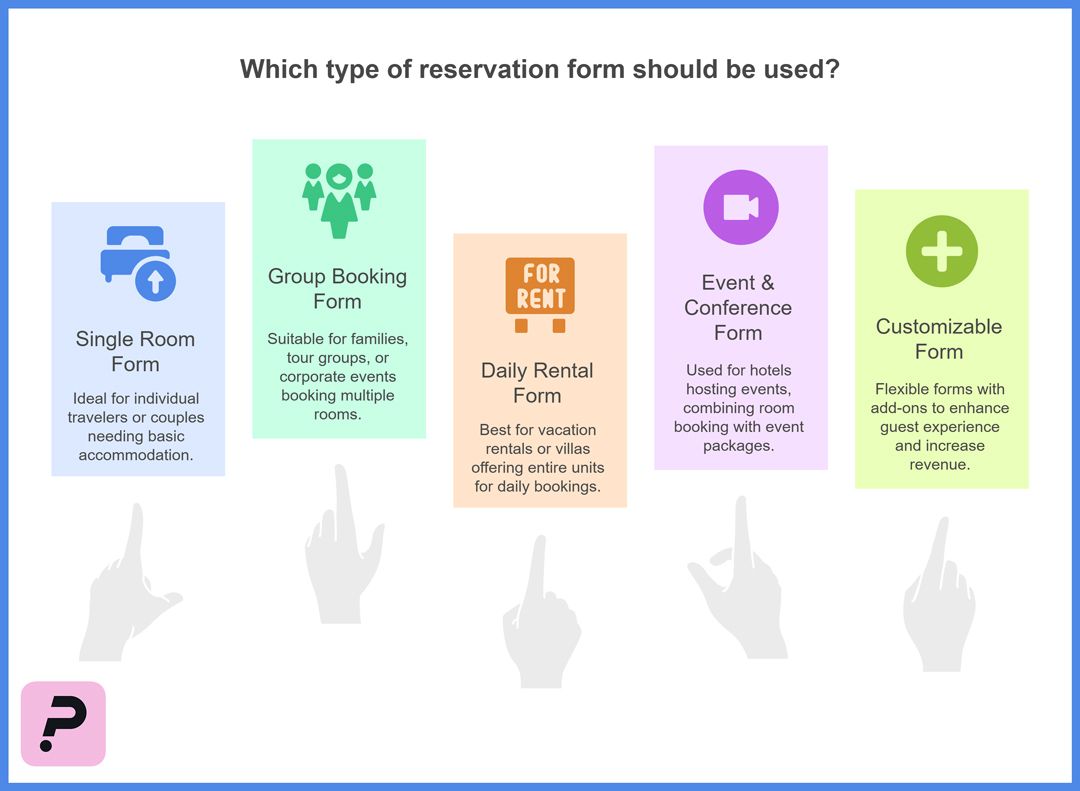
1. Single Room Reservation Form
Designed for individual travelers or couples. It includes basic fields such as guest details, room type, and check-in/check-out dates.
Ideal for business hotels or short-stay accommodations.
2. Group Booking Form
Used when multiple rooms are booked at once—for families, tour groups, or corporate events.
Includes fields for number of rooms, group leader details, and optional meal or event services.
3. Daily Rental Form (Apartments & Villas)
Perfect for vacation rentals, villas, or countryside lodges where guests can book entire units for a day or more.
Allows selection of property type, amenities, and special requests.
4. Event & Conference Reservation Form
Hotels that host events or conferences use a specialized form that combines room booking with event package details.
Includes options for meeting halls, catering, and technical equipment.
5. Customizable Reservation Form
Flexible forms that can be tailored with add-ons such as airport pickup, breakfast packages, or loyalty discounts.
Helps hotels increase revenue per booking while enhancing guest experience.
📌 By tailoring your hotel room reservation form to these use cases, you can make the booking process more personalized and efficient for every type of guest.
Suggested Questions for a Hotel Room Reservation Form
A well-structured hotel room reservation form should capture all the essential details without overwhelming the guest. Below is a suggested list of questions you can include, along with their purpose:
| Question | Type | Purpose |
|---|---|---|
| Full Name | Short Text | Identify and personalize the booking |
| Email Address | Send confirmation and updates | |
| Phone Number | Short Text (phone) | Enable quick communication if needed |
| Check-in Date | Short Text (Date Picker) | Define start of the stay |
| Check-out Date | Short Text (Date Picker) | Define length of stay |
| Room Type (Single, Double, Suite) | Multiple Choice | Specify the guest’s accommodation preference |
| Number of Adults | Numeric Field | Allocate the right room capacity |
| Number of Children | Numeric Field | Prepare extra beds or family services |
| Special Requests (e.g., view, bed type) | Long Text | Allow customization for guest comfort |
| Add-on Services (Breakfast, Airport Pickup, Spa) | Multiple Choice | Upsell additional services |
| Payment Method (Credit Card, Pay at Hotel) | Multiple Choice | Streamline billing and avoid delays |
Best Practice Tip: Keep the form simple. Start with essential questions (name, dates, room type) and then offer optional fields like add-ons or special requests to avoid overwhelming the user.
By asking the right questions, hotels not only secure accurate booking details but also personalize the guest experience and create opportunities for upselling.
How to Create a Hotel Room Reservation Form with Porsline (Step-by-Step Guide)
Designing a professional hotel room reservation form doesn’t require coding skills. With Porsline, hotels and rental properties can create a fully customized booking form in minutes. Here’s how:
1. Sign Up on Porsline
Go to Porsline and create a free account.
Access the dashboard to start building your first form.
2. Choose a Template or Start from Scratch
Select the Hotel Room Reservation Form template from the template library.
Or, use the drag-and-drop builder to design your own.
3. Add Essential Fields
Include:
- Guest details (Name, Email, Phone).
- Check-in and check-out dates.
- Room type selection.
- Number of guests (adults/children).
- Add-on services (breakfast, transport, spa).
4. Apply Logic (Smart Booking)
Show or hide questions depending on guest choices (e.g., if “Airport Pickup = Yes” → show flight details).
This ensures a personalized booking experience.
You can also set a quota (capacity limit) within the form, ensuring that bookings automatically close once the available rooms or units are fully reserved—preventing overbooking and improving efficiency.
5. Customize the Design
Add your hotel logo.
Apply your brand colors (luxury gold, business blue, resort turquoise, etc.).
Include images or short videos of rooms to increase trust.
6. Set Up Notifications & Confirmation
Enable instant email notifications for hotel staff and guests.
Send a confirmation message once the form is submitted.
7. Accept Payments (Optional)
With Porsline’s advanced plans, integrate secure payment options.
Accept credit cards, online transfers, or deposits directly through the form.
8. Publish & Share
Embed the form on your hotel website.
Share the link on social media or send it via email.
Generate a QR code for walk-in promotions.
9. Track & Analyze Bookings
View all reservations in your Porsline dashboard.
Export data to Excel or integrate with CRM systems (Salesforce, HubSpot, Zoho).
Use analytics to monitor occupancy trends and improve services.
With these steps, your hotel can digitize its booking process, reduce administrative workload, and deliver a seamless reservation experience for guests.
Ready to simplify your hotel booking process and deliver a seamless guest experience?
With Porsline, you can build a fully customized hotel room reservation form in just minutes—no coding required.
FAQ – Hotel Room Reservation Form
What is a hotel room reservation form?
A hotel room reservation form is an online form that collects guest information such as dates, room type, and special requests to confirm bookings quickly and efficiently.
Why should hotels use an online reservation form?
Online forms save time, reduce booking errors, allow 24/7 reservations, and improve the overall guest experience compared to traditional phone or paper bookings.
Can I customize my hotel room reservation form?
Yes, with tools like Porsline, you can fully customize your form by adding your hotel logo, brand colors, images, and conditional logic to personalize the booking process.
Is it possible to integrate payment in the reservation form?
Absolutely. Advanced booking forms allow payment integration so guests can pay securely online, reducing cancellations and guaranteeing confirmed bookings.
How can I share the reservation form with guests?
You can embed the form on your hotel website, share it via social media, email it directly to guests, or generate a QR code for quick access.