English Language Level Quiz
How good is your English — really?
This English Language Level Quiz is a fast, smart, and CEFR-aligned way to measure your grammar, vocabulary, listening, and writing skills. Whether you're a student, teacher, language center, or HR team, this quiz helps place individuals in the right level — from A1 (Beginner) to C2 (Advanced).
This article introduces a fast, reliable English Language Level Quiz designed to assess learners’ language skills and place them in the appropriate CEFR level (A1 to C2). It walks educators, language learners, and HR professionals through the purpose of the quiz, how it works, what skills it tests, and how to deploy it using Porsline — a powerful form builder with smart scoring and reporting tools.
What Is the English Language Level Quiz?
An English Language Level Quiz is a diagnostic tool used to evaluate a person’s proficiency in English and classify them into a level based on global language standards like CEFR (Common European Framework of Reference for Languages).
How It Works:
The quiz is structured around four key language skills: (Grammar - Vocabulary - Listening - Writing)
Most quizzes use 15–25 questions of increasing difficulty
Based on the total score, users are placed into one of six CEFR levels:
A1 – Beginner
A2 – Elementary
B1 – Pre-Intermediate
B2 – Intermediate
C1 – Upper-Intermediate
C2 – Proficient
Where It’s Used:
| Use Case | Description |
|---|---|
| Language Institutes | To place students in the correct course level |
| Schools & Universities | As a placement or entrance requirement |
| Employers (HR Assessment) | To evaluate candidates’ business English skills |
| Online Courses & Apps | To recommend a starting level |
The English Language Level Quiz is a highly practical tool to classify learners or employees quickly and efficiently — using standardized and globally recognized criteria.
Start now using the ready-made English Level Quiz template
Why Use an English Language Level Quiz?
Whether you're running a language program, onboarding new employees, or designing a personalized learning journey — knowing someone's English level is the starting point. Here’s why using an English Level Quiz is not just useful… it's essential.
Key Benefits:
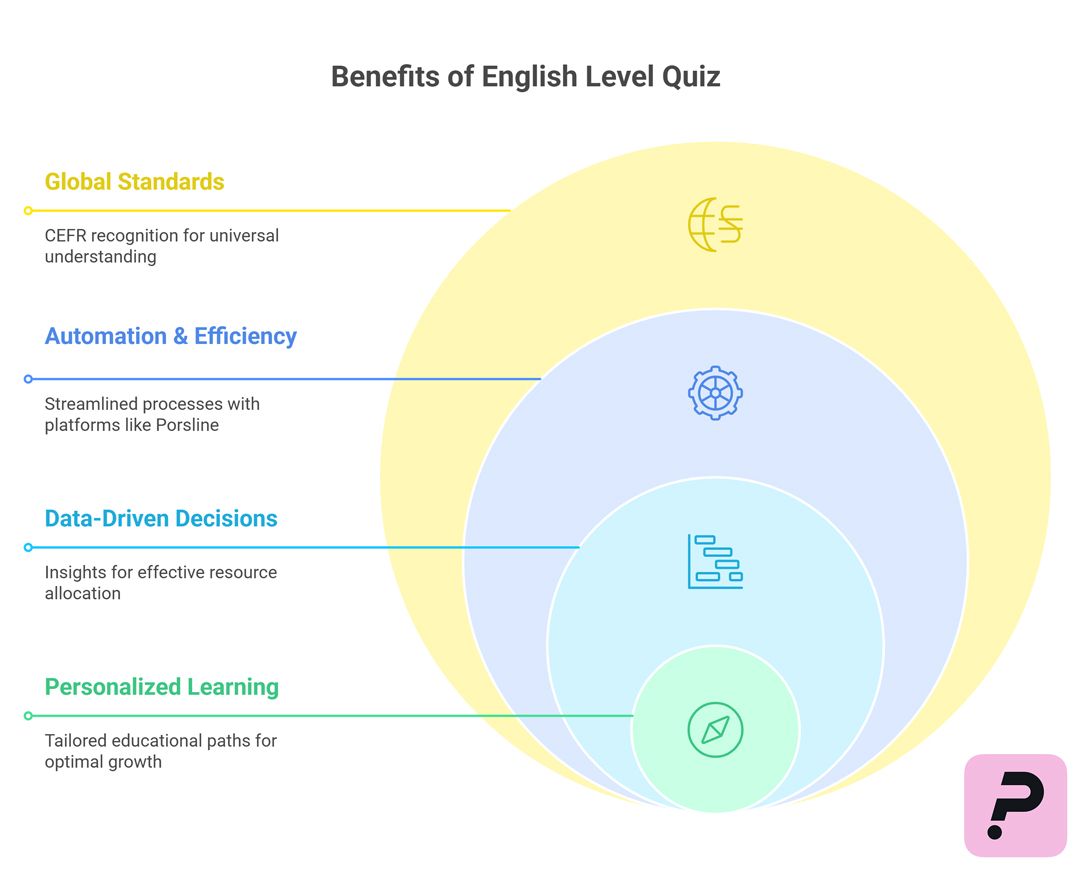
1. Accurate Placement
The quiz ensures that learners or employees are placed into the right level based on real skill assessment, not self-perception.
2. Better Learning Outcomes
By placing individuals in the right CEFR level, you prevent:
Frustration from over placement
- Boredom from under placementThis leads to higher engagement and better progress.
3. Data-Driven Decision Making
Test results can help educators, managers, and program designers:
Identify skill gaps
Personalize training paths
Optimize resource allocation
4. Automation & Efficiency
Using platforms like Porsline, the quiz:
Auto-grades answers
Calculates scores
Instantly displays the user’s level
Sends results to decision-makers
5. Global Language Standards (CEFR)
CEFR is widely accepted in education and HR across the world. The test output is instantly recognizable to:
Schools and universities
Employers
Language certification bodies
An English Level Quiz is more than a test — it's a smart entry point into structured education, fair evaluation, and personalized learning journeys.
Types of English Level Quizzes
Not all English level quizzes are created equal. Depending on the context, you may need a different structure, scoring logic, or language skill focus. Here's a breakdown of the most common types.
Common Variations by Use Case:
| Quiz Type | Description | Ideal For |
|---|---|---|
| General Placement Quiz | Assesses grammar, vocabulary, and comprehension using 15–25 questions | Language centers, ESL programs |
| CEFR-Aligned Academic Quiz | Structured by CEFR levels (A1–C2) with detailed scoring logic | Universities, formal institutions |
| Self-Assessment Quiz | Simplified version with instant results and visual feedback | Individual learners, apps |
| Corporate English Assessment | Tailored to workplace communication, emails, and formal writing | HR teams, corporate onboarding |
| Listening-Focused Quiz | Audio-based with accents and spoken context | TOEFL/IELTS prep, auditory learners |
| Kids/Young Learners Version | Visual, simplified language with voice-overs or images | Primary schools, language apps |
Purpose: Is it for education, hiring, or personal development?
Skill Focus: Do you need grammar-heavy, listening-heavy, or writing-based?
Assessment Depth: Do you want self-graded or manually reviewed sections?
Experience Level: Is your target beginner (A1) or advanced (C1–C2)?
Choosing the right type of English Language Level Quiz helps ensure the results are not only accurate — but relevant to your learning or organizational goals.
Suggested Questions for an English Level Quiz
A strong English level quiz includes a balanced mix of question types that evaluate grammar, vocabulary, listening comprehension, and — optionally — writing. Below is a sample structure you can adapt or use directly.
Suggested Question Structure
| Question | Type | Purpose |
|---|---|---|
| What time does the train leave? | Multiple Choice | Tests basic grammar (present simple) |
| She _____ to work every day. | Dropdown | Assesses verb conjugation (he/she/it) |
| Listen to the conversation. What did the woman order? | MCQ | Tests listening comprehension |
| What’s the opposite of ‘expensive’? | Multiple Choice | Assesses vocabulary |
| Write 3–5 sentences describing your morning routine. | Open Text | Evaluates writing skills (manual review) |
Grammar (5 questions)
Subject-verb agreement
Tense usage (past, present, future)
Modal verbs (can, should, must)
Vocabulary (5 questions)
Synonyms / antonyms
Prepositions in context
Collocations and word choice
Listening (5 questions)
Short dialogues with everyday contexts
Audio-based questions with accents
"What did they say?" comprehension
Writing (optional, 2–3 questions)
Open-ended prompts (paragraphs, email, story)
Manual scoring recommended
Tip: Use randomized question pools (if your platform supports it) and logic to adjust question difficulty based on previous answers.
The right mix of question types helps build a complete picture of a learner's level — and delivers reliable results you can use for placement, hiring, or personalized learning.
How to Create a Professional English Level Assessment Using Porsline
As digital assessment tools continue to evolve, Porsline has become a top choice for creating professional English level quizzes. With its smart interface, you can build an auto-graded quiz with a custom answer key, dynamic score ranges, and tailored user experience — all without writing code.
First: Set Up the Quiz Framework
-
Create a new form or start from a ready-made template in the Porsline Template Library.
-
Add a clear title, such as:“English Language Level Quiz – CEFR Based”
-
Include a welcoming description that explains the quiz purpose and sets expectations:

“Take this quiz to determine your actual level in English based on the CEFR framework. Once submitted, you’ll instantly receive your results and personalized feedback.”
Second: Add and Categorize Questions
Organize your questions by skill group: Grammar, Vocabulary, Listening, and Writing
Third: Create an Answer Key & Activate Scoring
1. Mark Correct Answers in Eligible Questions
For question types that support scoring (MCQ, numeric, dropdown), assign the correct answer directly.
⚠️ Important Note:Marking correct answers does not automatically calculate scores. You must configure the scoring ranges manually.
2. Enable the Answer Key
-
Go to: Settings > Online Testing Mode >Answer Key
-
Activate: ✅ “Create Answer Key”
-
Then proceed to: “Define scoring ranges based on the answer key”
3. Define Score Ranges by CEFR Level
| From | To | Score Display |
|---|---|---|
| 0 | 5 | Your level is A1 – Beginner |
| 6 | 10 | Your level is A2 – Elementary |
| 11 | 13 | Your level is B1 – Pre-Intermediate |
| 14 | 16 | Your level is B2 – Intermediate |
| 17 | 18 | Your level is C1 – Upper Intermediate |
| 19 | - | Your level is C2 – Advanced |
From the Endings section, enable the Reload/Redirect button, then choose 'Redirect to: Results Link'
Fourth: Customize the Quiz Interface
To ensure a polished, user-friendly experience, it’s important to customize the quiz interface to reflect your brand and keep users engaged throughout the test.
Use a dark blue tone (e.g., #1F3A93) for the question text to improve focus and readability. For the background, opt for a light gray (#F7F9FC) or clean white (#FFFFFF) to create a comfortable contrast that’s easy on the eyes.
For navigation and submit buttons, choose bold, interactive colors like vibrant blue (#3498DB) or warm orange (#F39C12) — both encourage action and improve the user’s willingness to engage with the form.
In terms of typography, we recommend modern, web-safe fonts.
Finally, reinforce your brand identity by adding your institution’s logo at the top of the form and using consistent design elements across all quiz pages. This not only improves aesthetics but also builds trust with test-takers.
Example for Thank You Message using variables:“Thanks for taking the quiz! Your result is @score out of 20. Your estimated CEFR level is: B2.”
These visual and functional customizations create a more engaging and trustworthy experience for your users.
With Porsline’s smart tools, you can design a professional English level quiz that features:
-
A custom answer key
-
Real-time scoring
-
CEFR-based placement
-
Dynamic feedback
-
Visual customizationWhether you're evaluating students, employees, or independent learners — this solution delivers accurate results, instantly and at scale.
Now that you understand the value of English level quizzes, their structure, and how to build them on Porsline — it’s time to put it into action.
Start now using the ready-made English Level Quiz template
Save time, ensure accurate placements, and deliver a smart, data-driven language evaluation experience.
Let testing be the first step in every learner’s personalized journey.
English Language Level Quiz (FAQ)
1. How accurate is the English Language Level Quiz?
The quiz is aligned with CEFR standards and uses a balanced mix of grammar, vocabulary, listening, and writing to estimate proficiency. For best accuracy, include at least 15 scored questions.
2. Can the quiz calculate results automatically?
Yes. On platforms like Porsline, you can create an answer key, assign points, and define CEFR score ranges. Results are calculated and shown instantly after submission.
3. What is CEFR and why is it used?
CEFR (Common European Framework of Reference for Languages) is a global standard that defines six levels of language proficiency, from A1 (beginner) to C2 (advanced). It helps in consistent placement across schools, companies, and learning platforms.
4. Who can use this quiz format?
Language institutes, universities, HR departments, and even online learning apps use this format to quickly place students or assess candidates’ English proficiency.